
Network Administrator
Easily make changes and tweaks to computers across your network with one press of a button.
Product Links
News And Tips
Network Administrator
Network Administrator allows you to make tweaks, changes, and updates across your network. It has an amazing plugin system that is packed full of actions.
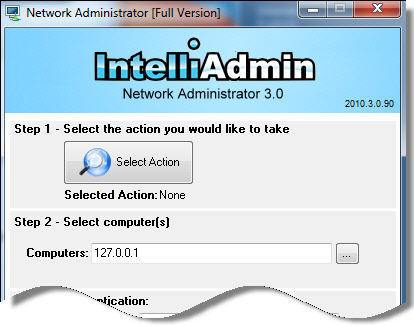
Network Administrator can:
Cleanup Temp Files

Reduce the size of those bloated profiles. Clean out temp files from all profiles, and the system temp folder.
Get the Dell service tag number remotely

Need to find the service tag of a computer remotely? It is easy with Network Administrator
Disable or enable cloud features in Office 2013

Tired of getting prompted for cloud options in Office 2013? Network Administrator can make your skies clear again.
Cleanup Automatic Update Files

Remove service pack and patch uninstall files to free up space
Report amount of free disk space

What computers are low on drive space? Network Administrator can help you find out
Report USB Devices Installed

What USB Devices are installed on your Network? This plugin will let you take a look.
Silently install the latest security patches

Want to make sure the latest security patches are installed? Network Administrator can silently download and install the latest critical, and security patches.
Show you the last person to logon

See what user logged on to a machine last. Network Administrator can show you the account name, and the date and time.
Send instant messages

Need to notify your users that the server is going down in five minutes? Don’t mess with ‘net send’ any longer. Network Administrator can send that message to users in a flash.
Change network configuration

Want to switch 1000 hosts to DHCP? Have new DNS servers? No problem, with this plugin you can change them in a few clicks
Daylight Saving Time Update

Easily update those older NT 4.1, Windows 2000, and XP machines to the latest DST settings without being forced to purchase a $5000 patch from Microsoft.
Disable CDROM and DVD Drives

Keep users from installing unwanted software. Disable and enable their CDROM / DVD drives with ease.
Show all users who logged on to a machine
Get a complete list of users that ever logged on to a machine. Includes the user type (Standard or Administrator), and the date and time that they logged in.
Disable CDROM and DVD Burning

Keep users from copying data off your network. Disable DVD and CD burning while allowing users to still have read only access.
Set Excel 2007 to save in the older format

Having a problem with users sending Excel 2007 documents to people outside your network? Reduce those help desk calls by forcing all of your Excel 2007 users to automatically save in the 2003/XP format.
Disable Floppy Drives

Prevent users from accessing their floppy drives and installing unwanted software.
Folder copy

Have a set of shortcuts you want to copy to everyone’s desktop? Or a configuration file you need to place on their C Drive? Use the folder copy plugin to copy files and folders to many machines in just a few clicks.
Block IE 7 Automatic Install

Need to keep IE 6 on your network, and want to prevent those dreaded calls after users install IE 7? Use the IE 7 blocker to prevent the automatic install of IE 7.
Block IE 8 Automatic Install

Keep IE 7 standard on your network by blocking the automatic install of IE 8
Block IE 9 Automatic Install

Keep IE 8 standard on your network by blocking the automatic install of IE 9
Kill Processes

This plugin can kill a process by name across your network. Got a piece of spyware that uses a common filename, but keeps randomizing a prefex? Use the wildcard feature to zap them all
Logon Disclaimer

Have legal statements that need to be declared to users before they logon? Use the logon disclaimer to notify them
Manage Services

Stop, Start, and modify services using the manage services plugin
Disable Offline Files

Every fresh install of Windows XP has the ‘Offline Files’ feature enabled. This annoying functionality can be disabled with this plugin
Change Power Management Settings

Save energy by making changes to the power management settings on computers across your network
Remote Desktop Enabler

Have remote registry access to a remote machine, but remote desktop is disabled? Remote desktop enabler can turn on remote desktop so you can get into that machine asap.
Remote Desktop Port Set

Want to change the port Remote Desktop uses to listen for connections? Use this plugin to change the port that Remote Desktop listens on.
Remote Execute

Got an MSI file you want to install silently on 100 machines? Network Administrator can do it in a few clicks. Build batch files, or VBS files and easily execute them remotely.
Set Background Wallpaper

Have a corporate logo you want to have on everyone’s background? Use the wallpaper plugin to set it across your network. It will even take care of copying it to the remote host for you.
Set Local Administrator Password

Resetting the domain administrator password is easy, but what happens when an employee leaves the company and you have 50 machines with the same local administrator password? Normally, you would walk around to each one and change it. With the ‘Set Local Administrator Password’ feature you can change it across your network without even getting out of your chair.
Set VNC Password

Use Tight VNC, or Real VNC on your network? Need to change the password on a 100 or 1000 machines? Network Administrator can change them all in one sweep of your network.
Reboot or Shutdown Computers

Quickly shutdown, or reboot computers. You can even set a time limit before your action takes place, and tell users why they need a reboot or shutdown.
Disable USB Flash Drives

Prevent access to USB flash drives, while allowing USB based keyboards, mice, and scanners.
Windows Autologon

Set windows to automatically logon as a specific username and password.
Word Default Document Set

Upgrade to Office 2007 or 2010, but want users to save in 2003/XP format by default? Use the default document set feature to make this change in a flash.
Disable Control Panel Access

Users keep messing with the control panel, and making life hard for you? Use the control panel plugin to disable access.
Disable that pesky “downloaded from the Internet” warning

Get rid of that pesky warning you get when trying to execute downloaded files.
Disable the auto maximize feature in Windows 7

In Windows 7, windows will maximize automatically when you drag them to the edge of the monitor. Disable this ‘feature’ with ease.
Share drive mappings with elevated apps

Have you noticed that in Windows 7 or 2008 you can’t see mapped drives in an elevated command prompt? This fixes that by enabling mapped drive sharing between standard and elevated apps.
Disable CDROM and DVD Burning
Prevent users from burning DVD and CD Roms – No longer will you need to worry about data leaving your network.
Reset The Printer Spooler

Got a printer that corrupts printer jobs once in a while? Stop wasting time deleting them by hand. Use this plugin to quickly clear out the jobs and get printing again.
Download a free trial
Try it out for free. Download and install our trial
Buy it Today!
No per-computer license needed. Only one license needed for each administrator.
The list of plugins is growing all the time, and when you purchase you will automatically get new plugins delivered to you as soon as they are released.
Purchase includes 1 year of free plugin and application updates.
Got an idea for a plugin? Send it to us at plugins@intelliadmin.com and we will add it to the wish list.