
Previous Posts


Microsoft to require all 64 bit drivers to be sign...

Display serial number of your Windows XP, or 2003 ...

Fix the broken search feature in Windows XP & 2003...

Updating Windows XP Product Key

How to get IntelliAdmin 2006 to work with Windows ...

Enable file and printer sharing on XP SP2

CNAME Sharing disabled in Windows 2003 SP1

Two new vulnerabilities found in image preview fea...

Keep XP SP2 from rebooting your machine automatica...

Apple Unveils new intel line


Archives

May 2005

January 2006

April 2006

May 2006

June 2006

July 2006

September 2006

October 2006

November 2006

December 2006

January 2007

February 2007

March 2007

April 2007

May 2007

June 2007

July 2007

August 2007

September 2007

October 2007

November 2007

December 2007

January 2008

February 2008

March 2008

April 2008

May 2008


Subscribe to our Feed:


Script XP System restore points

The system restore tool that is bundled within Windows XP is priceless. Numerous times I have helped myself or others get their system back to a working state by restoring to a previous image. To restore to a previous state just click on Start -> All Programs -> Accessories -> System Tools -> System Restore
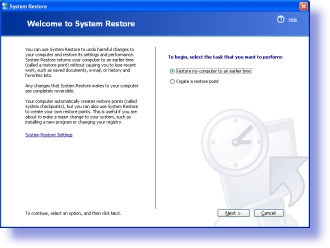


Clicking on next you will see a calendar. The days that are available will be in bold:
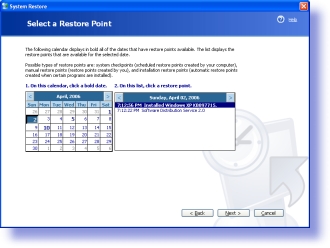


This is the problem. Many times the day you really need is never there.

We have a short and sweet script that you can put into the system scheduler, or in the users login script that will force the creation of a system restore point without anything displayed to the user:

CreateRestorePoint.vbs


Posted By: Steve Wiseman on Thursday, April 13, 2006

Check out our utilities for windows


Copyright © IntelliAdmin, LLC, 2008. All Rights Reserved