
We all have been there. It is 4:55 and you want to get out of work…But you want to make sure your system is shutdown for the night. You dutifully close all of your applications and start shutting down
5 minutes later it *finally* powers off
It happens to more machines that it should. I decided to see what the problem might be. I searched google, forums, and newsgroups for an answer. The biggest culprit is a problem unloading the current users profile.
This can happen when third party, or even Microsoft applications have not properly cleaned up when exiting. Windows will keep trying to unload the profile until Windows finally decides that it can’t and should shutdown. Even if you find the application causing the problem – it may be impossible to do anything about it.
This is why Microsoft released the User Profile Hive Cleanup Service
This free utility automatically cleans up user profiles and prevents you from playing the timeout wait game.
Once you run the setup wizard it will look like the installer did nothing. If you open up your services list (Click start, then run and type services.msc now click ok), you will see that a new service is running in the background:
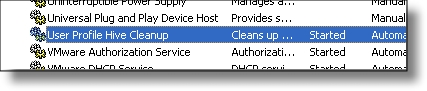
The idea of this program is to reclaim resources when a task is finished (memory, handles, etc). It accomplishes this by monitoring for users to log off and verifying that unused resources are reclaimed. This approach is superior as it works for any known reason that profiles do not unload and also will keep working to address new unknown issues.
Now when you go to shutdown, logoff or restart it will happen within seconds. Instead of minutes.
One more thing…Subscribe to my newsletter and get 11 free network administrator tools, plus a 30 page user guide so you can get the most out of them. Click Here to get your free tools
{ 3 comments… read them below or add one }
Great, clear forward info. (Easy to find locations. Quite a treat, compared to even, PC Amg, where several times, trying to accomplish a “tweek” only to find that that folder etc doesn’t exist on your machine?)
thanks, Cheers
User Profile Hive Cleanup Service 404’d
bugger.
look here instead:
http://www.microsoft.com/downloads/en/details.aspx?FamilyID=1b286e6d-8912-4e18-b570-42470e2f3582&DisplayLang=en
greets,
wojtasl