
The Windows XP Welcome screen. Pretty pictures for each user account. What a nice thought on Microsoft’s part. The only trouble is – I want to create an administrator account, and not have others tempted to try getting into it while they are on my computer.
When windows XP is not joined to a domain, it displays a welcome screen when it first boots:
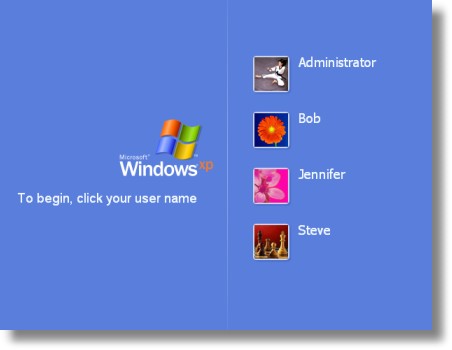
The welcome screen displays all of the local users on the system, except the built-in administrator account that was created during setup. If we want to hide a specific user from the list, we need to create a special value under this registry key:
HKEY_LOCAL_MACHINE\Software\Microsoft\Windows
NT\CurrentVersion\Winlogon\SpecialAccounts\UserList
Under this key you simply create a new DWORD value – the name matches the users name exactly, and the value is one of the following (Decimal format)
0 – Hides the user just from the welcome screen
1 – The user is shown
Before you start putting values in this key, I want to warn you. This tip is particularly dangerous. If you make the wrong move, you could make it nearly impossible to get back into your system. Don’t blame me if you hose your system!
To hide the users I want, I browse to the registry key on my system:
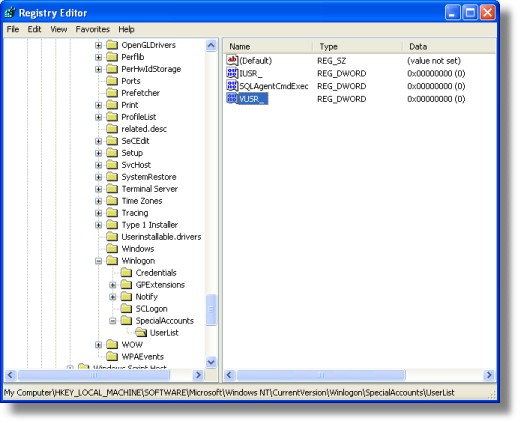
Now I want to hide all of the accounts except Jennifer, so I add each of the accounts shown on the welcome screen, and give them a value of zero.
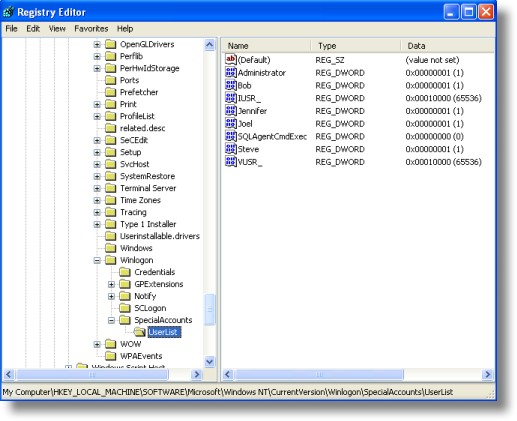
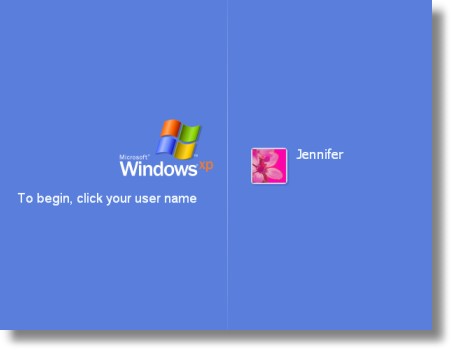
that’s all we need to do. I log off, and now I only see Jennifer’s account:
Here’s the big question. How do you log on as a hidden user? If you are running windows XP Professional you simply need to press CTRL-ALT-DEL twice, and the standard logon screen will be displayed. This has one pitfall – it will fail to work if a user is still currently logged in. If you are having trouble getting it to show, then reboot and press it twice before any users have logged in. Secondly, if you are running Windows XP Home, you will need to boot in safe mode to use the hidden account. The CTRL-ALT-DEL trick does not work for XP Home.
Now here is the cool part. We have made a program that will do this for you. No need to mess around in the registry!
The program, while easier, does not exclude you from the danger I spoke of before. Please think about what you are doing before you remove a user from the list!
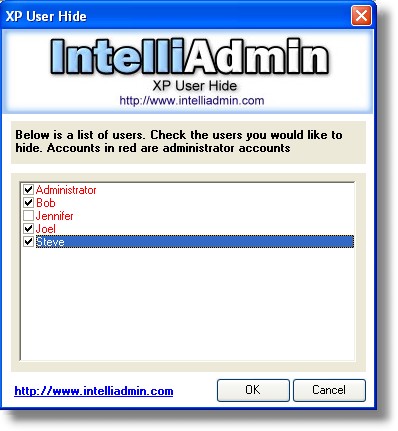
Just download it from here
As always we do not have any spyware, or adware in our freeware, and just like most of our freeware this program will run fine from a floppy, CD-Rom, or USB flash drive…no installation needed.
One more thing…Subscribe to my newsletter and get 11 free network administrator tools, plus a 30 page user guide so you can get the most out of them. Click Here to get your free tools
{ 47 comments… read them below or add one }
Thanks – as a computer tech for ‘users’ – i have to keep peoples computers safe from themselves…
it worked perfectly…
Thanks, man. I needed to hide a special account for a program.
Um, this is all good and stuff, but how do I make it so my computer starts on the log in screen? Because at the moment it just goes automatically to the administrators account. I do only have one account on my computer, but my brother does too and his starts up on the login screen?
Nevermind, I have fixed it now!
I have the reverse problem. When I start up the Administrator account is not displayed as a login option. How to I make it display?
You should be able to load the above program and see the hidden account. Un-check it and the account will display.
Cilck Start>Run>type in cmd>type in net user /active:no also can hidden account.
hi,
first, sorry, my english is horrible
all works until this: Under this key you simply create a new DWORD value – the name matches the users name exactly, and the value is one of the following (Decimal format)
it says the name already exist but there is no value with the name of the user. I cant create
thanks
thanks, I tried to use your programm and now all users apear. everything is working.
THX 😉
The Administrator account will only show if its the only account in use, otherwise it dissappears, and you have to use the control alt delete method, or right click a program etc etc…
right click — runas …
Hi, everything is fine until I get into the Winlogon part. The Special Accounts and User List does not show up. Ive tried everything and i do not know what to do!.
Please help,
Thanks alot
Ctrl+Alt+Del does work! you just have to tap del twice.
Didn’t work for me. I’m using Windows XP Pro SP3
Update: found the problem- If you have ever renamed the user account you’re trying to hide, you need to use the original account name as the DWORD title. Example: the account I was trying to hide was named “Admin2” but before I changed it’s name to that, it was “! Admin !”. Setting “Admin2” to be hidden did not hide the account on the welcome screen, but setting it to “! Admin !” did. If you aren’t sure of the actual name of the account you’re trying to hide, browse to the “My Documents” of that user, then right click any folder and go to “Properties”. In the location field, you will see something like, “C:\Documents and Settings\! Admin !\My Documents” which shows the actual username ( “! Admin ! ” )
when i log on the screen showing all the user account does not appear only a dialog box for login appears
it used to appear how do i make it reappear
pls email reply to sm.montreal@gmail.com thanks
Works great. Will this work with windows 7?
Yes, it should work fine with 7.
When hiding users, it appears that there must be at least one remaining account that still has admin status. I wanted to set computer up with two boys with limited accounts, and my own admin account hidden – results in Administrator account appearing along with the two boys accounts; Funny thing that microsoft urges the computer owner to never run in admin mode and it truly would be handy to “hide” all the admin accounts from hackers on the welcome screen, but still have full function using the “run as” option if logged in as a limited user, or ctrl-alt-del your way into the admin accounts.
Bubba
To get the administrator to hide as well, create your own admin account, in addition to the default administrator account, so you have 2 accounts with admin privileges (I called mine admin) , the one you created and the default one that is called administrator.
Then add a registry key as described here for both administrator and (in my case) admin
That should do it
Thank-you. Worked perfectly. Only “catch” is to make sure that at least one of the remaining accounts has ADMIN rights. The account I hid was the Administrator account which I had renamed. Forgot to make the only remaining user and ADMIN. Had to do the CTRL-ALT-DEL, twice, to go back in and make him and ADMIN.
Stupid mistake….
Thanks for the tip!
Thanks for the tip folks, worked well.
My question is… how did my GoDaddy web-based work email account get into the Welcome screen? It is not set up in Outlook or Outlook Express – but as a stand alone 3rd party web-based email account…
Is it a possible hack or rogue software? I did recently have an issue, and used ComboFIx to solve the problem (though 2 or 3 weeks ago – since deleted ComboFix. It showed up on Thursday (GoDaddy email on Welcome) – and have no idea how and why it showed up.
Plus it removed all of my GoDaddy “inbox” emails, though “sent” emails still remain.
Very odd
Cheers
Odie1941
hi love the program but would this program also work for vista?
I use this method for Windows XP and now I’ve started using Windows 7 I’ve found the user hides but ctl alt del twice doesn’t work.
Nice tip. I tried hiding a couple of obsolete (but still potentially needed) accounts and it works great. Thanks!
Do you possible to hide user account from task manager?
Not that I know of…not without performing some type of hack on the task manager, or hooking the API calls used to pull that info
you just saved my ass from my ass of a friend who made a hidden account to use a keylogger to get my FB password. THANK YOU!!! now while I am not a computer expert I am a quick study and through the use of this article I destroyed his account >:) which he was stupid enough to name as his alias XD however, I am wondering if I can block accounts being created without an admin password. I do not think so, but is this possible?
Hi Nathan, only Administrators can create new user account.
If you want to know who are the administrators in your PC, open command prompt (Start -> Run -> type “CMD” -> Press enter) and type “net localgroup Administrators” and press enter.
It will list down all the users who has administrator rights.
you say in your article that if you make a false move you can make it almost impossible to get into your machine. i am guessing thats if you hide all the accounts that are available to login…??? well no actually you can hide all the accounts and still be able to login at the welcome screen, as long as you know at least one of the user names and passwords….. just hit CTRL>ALT>DEL twice and it will display a box asking for your username and password… 🙂
I wish that were true. Only specific versions of Windows XP will allow this. Make these changes under the wrong version of XP, Vista, or Windows 7 and without any accounts you could find yourself in a world of hurt.
Not particularly – you can still do it in safe mode
The CTRL-ALT-DEL trick, -does- work under Windows XP Home Edition. You press CTRL-ALT-DEL twice in a row at the welcome screen, and you can log in to any account.
i did this on windows xp home edition SP3 and the CTRL+ALT+DEL twice does work, i’ve used itit really helps to clean up the welcome screen
The article is flawed if the user name has been changed. As if you change your user name this is what shows on the login screen but is not actually your true username as it keeps the old name. To see this change, your username in control panel and then go into documents and settings on your local drive and the folder name remains as your old username. It is this name you need to add to the registry
Hello Anon,
Very interesting. I did not know that.
Consider the first screenshot in this article with Administrator plus three other names. What could cause those other names to be visible but grayed out? I can’t click on them nor will the tab key move focus to any name but Administrator. I’m not sure how that happened and I don’t know how to enable the other names. This is XP Pro. Any thoughts? Thanks.
thanks a lot man!
Can someone help me? I was using registry editor on my Windows XP PC to try to hide my second computer account because I accidentaly created another one. But when I rebooted it, my administrator account “Administrator” was hidden and the second account was still shown. I was using XP User Hide and my account “Administrator” is still shown, but not in the login screen. So, if you know what the problem is, reply and… TELL ME HOW TO GET IT BACK!!! I WANT IT BACK RIGHT NOW!!!! Thank you.
Hello CEO100able,
You should be able to get around it by pressing CTRL-ALT-DEL twice….this article walks you through it:
http://www.petri.co.il/bypass_the_welcome_screen_in_windows_xp.htm
You might have to keep trying, in my experience it does not always work…don’t give up you should be able to get out of the welcome screen.
Just be happy it is on XP…if you made that mistake on Vista, or 7 it would be much more difficult
Okay then.
Apparently this does not work for Windows XP 64-bit SP2. I had created an account on my backup server just to allow backups from a customer laptop, so I used the username and password from that machine for the account. Backups work fine, but I am unable to eliminate the account from the login screen using this method.
Hey. I tried this in my computer and i was able to hide the account i wanted, only problem is i can’t log into the account once it’s hidden, at least not by tapping ctrl+alt+del or twice ctrl+alt+del. I was able to successfully log into the account by making it “unhidden” again, but i don’t want to have to “unhide” the account every time i want to use it. I’m using Windows Vista Home Premium 32-bits, so i’m guessing my problem has something to do with it.
Any solutions? Sugestions? Ideas?
Hello Chakotay,
This is change in Vista from XP…MS has decided to do this for security reasons.
This means that you are correct, you cannot use it to login at the desktop once it is hidden.
What you can use it for is running services under that account name, or using it for scheduled tasks, or using it for the runas command.
That is why under Vista and Windows 7 you need to be very careful…since you could effectively hide the admin account and never get back in.
Nice.
This article avers that the registry changes only affect the Welcome screen presentation, but there are also ControlPanel->UserAccounts consequences. As a couple of commenters have stated; the registry name cannot be any renamed account, but must be the ‘actual’ folder/directory name (please verify). The information on this page needs to be upgraded to be correct.
Funny… can´t find the XP user hide anywhere!