
Once and a while I have the need for Windows to automatically login after a reboot. For example, I have a Windows XP Media center machine, and I have a few custom cleanup and compression programs that run as desktop applications – so they don’t run if the machine is rebooted while I am gone.
This is a real bummer if I am on vacation, and by the time I come back it does not have enough room to record my favorite programs.
Automatic logins are not for everyone. Using this feature in windows leaves your password in the registry un-encrypted. You need to think carefully before you do it.
To force windows to login you need to drill down to this registry key:
HKEY_LOCAL_MACHINE\Software\Microsoft\Windows NT\CurrentVersion\Winlogon
In that key there are four values that are important:
AutoAdminLogon – A string value. Yes a string value. That is set to 0 or 1. If the value is 1, then the next time windows boots it will attempt to login with the credentials provided in the values shown below.
DefaultUserName – Username used to automatically login with.
DefaultPassword – Password used to automatically login with. Careful here. This is left in the registry unencrypted and easily read by anyone with an administrator account
DefaultDomainName – The domain name used when automatically logging in. Set to the name of the current computer name if the machine is not joined to a domain.
Personally, I have gotten tired of drilling down to these registry settings every time I want to make a machine automatically login, so I had one of our programmers whip out a quick app that will do it for us.
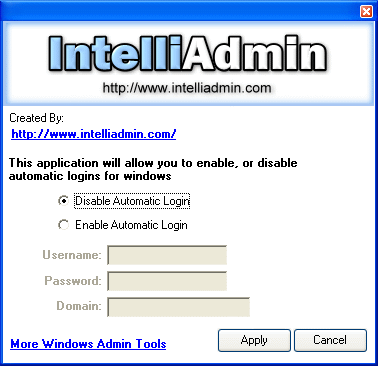
Click Here to download it – and as always, no spyware, adware…Just freeware goodness.
Oh yea, make sure you run it as administrator, and it does work with 2000, XP and Vista.
One more thing…Subscribe to my newsletter and get 11 free network administrator tools, plus a 30 page user guide so you can get the most out of them. Click Here to get your free tools
{ 9 comments… read them below or add one }
That’s so neat! Just what I wanted. Thank you
not compatible with windows 7 !!!!!!!!!
Yes it is. What type of problems are you having?
Steve
Thank you SOOOO much, that realy helped me!
Yes, thank you greatly! Also found if you add a binary value called AutoLoginCount, and set the value to the number of times you want to autologin, you can setup this feature for a short period of time for testing… or updates in my case…
IE:
Windows Registry Editor Version 5.00
[HKEY_LOCAL_MACHINE\SOFTWARE\Microsoft\Windows NT\CurrentVersion\Winlogon]
“AutoLogonCount”=dword:00000005
“AutoAdminLogon”=”1”
“DefaultUserName”=”WhoEver”
“DefaultPassword”=”PanzyLeopard”
Thanks for the comment Jeremy…
I should have put a link in this article. We discovered this registry key too…and have updated our software to allow you to use it:
http://www.intelliadmin.com/index.php/2007/10/limit-automatic-login-for-windows-xp-2003-and-vista/
Steve,
I am using Vista 32bit and am having a hard time booting to the desktop, like a did just a few short weeks ago. I have tried to undo everything I did and I still need to click on the user icon to get to the desktop. I have tried your freeware, going to control userpasswords2 to uncheck/check the “user must etc.”, created a password and deleted it and I still have to click on the user icon. I am the only one that is assigned to the computer, although there is a guest user but it is not active. Any ideas?
Thank you.
Hello, This works great when booting the PC but not when resuming from screen saver if “On resume, display logon screen” is selected. Any suggestions for that?
Note: administrator has that option locked down.
No way around it if the administrator has it locked down – Sorry 🙁