
While I am not busy ripping the new license terms apart I have been testing out everything I can within Vista, mostly to get our applications up to speed before the November 30th release. I found a cool feature when you go to the properties of a USB drive:
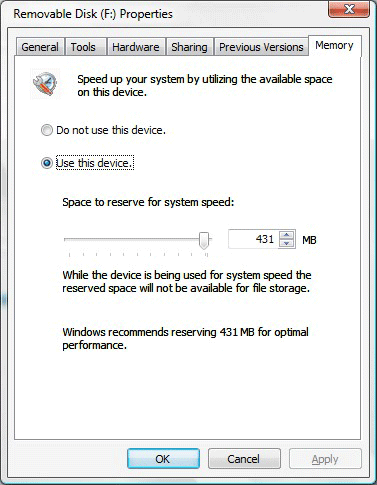
It allows you to reserve part of the USB drive for improving system performance. Nice. Now the programmer in me wants to know more. I did some googling and research. The feature is called ReadyBoost(tm).
Their marketing pages for Vista have more information about it. I will pull out the important parts for you:
Windows Vista introduces a new concept in adding memory to a system. Windows ReadyBoost lets users use a removable flash memory device, such as a USB thumb drive, to improve system performance without opening the box. Windows ReadyBoost can improve system performance because it can retrieve data kept on the flash memory more quickly than it can retrieve data kept on the hard disk, decreasing the time you need to wait for your PC to respond. Combined with SuperFetch technology, this can help drive impressive improvements in system responsiveness.
Hmm. First thought that comes to my mind is what happens when I pull the drive out. Blue screens? I tried it out and it seems to handle it with no problems. The next part from MS explains:
Windows ReadyBoost technology is reliable and provides protection of the data stored on your device. You can remove the memory device at any time without any loss of data or negative impact to the system; however, if you remove the device, your performance returns to the level you experienced without the device. Additionally, data on the removable memory device is encrypted to help prevent inappropriate access to data when the device is removed.
Very cool. With higher speed external interfaces, and bigger portable memory this could be a viable solution for the average Joe.
One more thing…Subscribe to my newsletter and get 11 free network administrator tools, plus a 30 page user guide so you can get the most out of them. Click Here to get your free tools