
A Windows 2003 domain controller comes out of the box with numerous default settings. The 15 day password reminder is one of them, and can be really annoying. Who wants to spend the next two weeks clicking NO every time they login?
Group policy can be used to change this to a more reasonable setting. I will show you how, and in my example I will set it to 5 days.
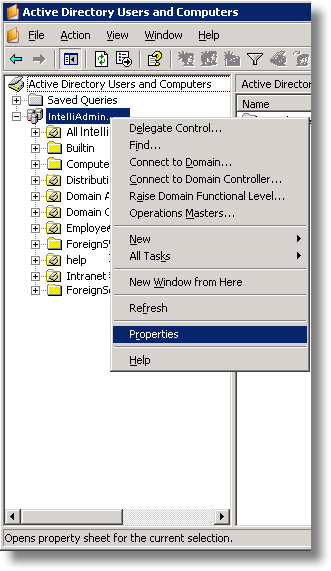
First we need to get into Group Policy for our 2003 Domain controller. On the domain controller, click to Administrative Tools, and open Active Directory Users and Computers.
Right Click on the domain name and go to properties
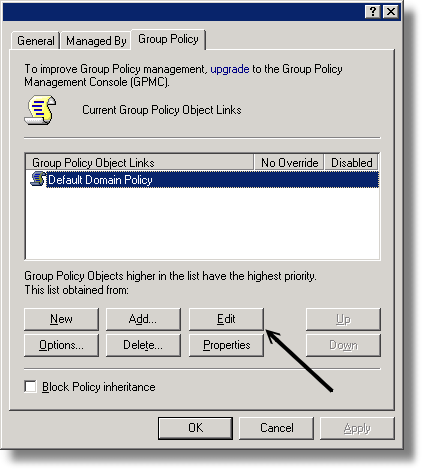
Move to the Group Policy tab, and select the policy you want to modify and click edit.
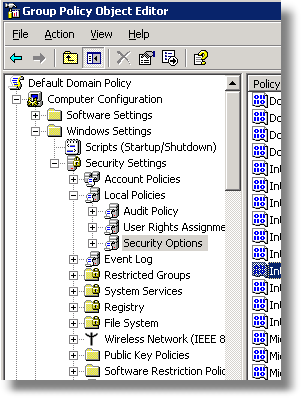
Now, drill down to
Computer Configuration -> Windows Settings -> Security Settings -> Local Accounts -> Security Options
On the right you will see a list of options. Scroll down to the item that says:
Interactive Logon: Prompt User to change password before expiration
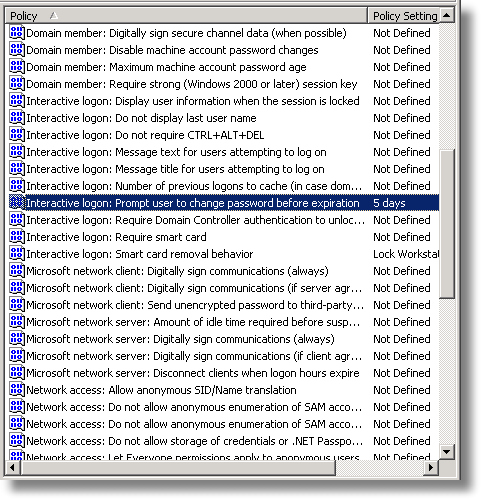
Double click on it. Check the option that says ‘Define this policy setting’, and set it to the number of days you want the reminders to start. In our example we set it to 5.
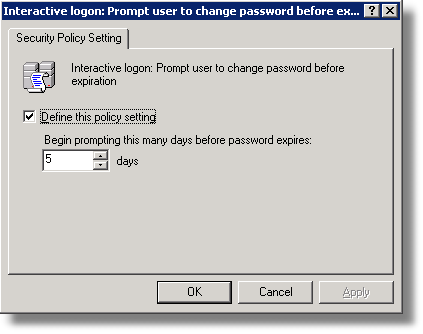
Click OK, and the policy is changed. It will take 15 to 30 minutes for it to be propagated out to machines on the domain.
Now password reminders will happen when you want them to.
One more thing…Subscribe to my newsletter and get 11 free network administrator tools, plus a 30 page user guide so you can get the most out of them. Click Here to get your free tools
{ 3 comments… read them below or add one }
VERY GOOD!
Thanks.
Very nice work. Thanks for the time and clear illustrations. Got me through quickly in a pinch!