
The Multimonitor support in windows is great. It is perfect for development – one screen for debugging, the other for the application. Better yet it is nice to have one monitor for television in Media Center, and the other for work.
Multiple monitor support has been there since Windows 2000, but Microsoft added some really nice features in Windows XP that made it a breeze.
In Vista, Microsoft introduced a new driver model. The core reason for this change was stability. Microsoft found that many blue screen crashes were caused by a bad Video driver.
To get Aero Glass, and Media Center to work in Vista, you need to have a WDDM (Windows Vista Display Driver Model) driver for your video card that supports the new model.
Here is the catch. If you have two different video cards that have different WDDM Drivers – one will be disabled. In other words you must have two video cards from the same manufacturer. Otherwise you will get a nastygram like this:
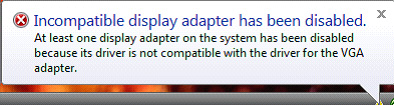
What is the solution? To downgrade to older Windows XP XPDM drivers. Goodbye Glass, and Goodbye Media Center…or go out and purchase another video card of the same make and model.
Why is it a problem? The biggest problem will be for the folks who already have XP Media center with two different cards. Right now it is working great, but when you upgrade Media center will no longer work with that configuration.
If you have two video cards, and are running XP Media center – Check your video card setup before upgrading to Vista.
For more detailed info, Microsoft has a short whitepaper on the subject
One more thing…Subscribe to my newsletter and get 11 free network administrator tools, plus a 30 page user guide so you can get the most out of them. Click Here to get your free tools