
The new version of Word saves documents in a different format. This is to facilitate all of the wonderful features it provides. Unfortunately this also means that documents saved will be incompatible with older versions.

Yes…It is possible to go into settings, and change the default format to whatever you please – that includes the longstanding .doc format
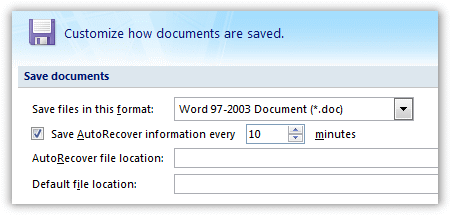
It will be difficult for the average user to remember or understand they need to save in the older format. If they don’t, they will have a great deal of trouble sharing their Word documents with the rest of the world.
If you are planning to deploy the new version of Office, how can you force Word to save by default in the .doc format?
We searched Google, and the knowledge base at Microsoft. Nothing. Hmm. How can we figure out what registry key Office is using to save this?
Easy. Export the Word registry key to a file and compare the difference after we make the change.
Here is the key I found:
HKEY_CURRENT_USER\Software\Microsoft\Office\12.0\Word\Options\DefaultFormat
Hah! That one is so easy to see I should have found it by browsing through the registry.
I changed to each setting, and found these possible values:
(Empty) – Word Document (.docx 2007)
MacroEnabledDocument – Word Document (.docm 2007 W/Macros)
Doc – Word Document (97 – 2003)
Template – Word Template (.dotx 2007)
MacroEnabledTemplate – Word Template (.dotm 2007 W/Macros)
Dot – Word Template (97 – 2003 Format)
WebArchive – HTML (.mht, .mhtml Single file HTML Format)
Html – HTML (.htm, .html HTML Format)
ReducedHTML – HTML (.htm, .html Filtered HTML Format)
Rtf – RTF (.rtf)
Text – Text (.txt)
FlatXML – XML (.xml 2007 XML Format)
XML – XML (.xml 2003 XML Format)
MSWorksWin6 – Works Document (.wps Works version 6-9)
We have written a utility that will help you deploy this on your network. It is a command line tool. You can put it on your server, and have it called from a login script. Here is the syntax
SetDefaultDocument.exe {Type}
The {Type} argument is any of the types shown above in bold.
If we wanted to set it to the well used 2003-97 doc format you could put this line in your login script:
SetDefaultDocument.exe Doc
Now you might not want to set it each time in a login script. Our Network Administrator program will do the same with an easy to use interface.
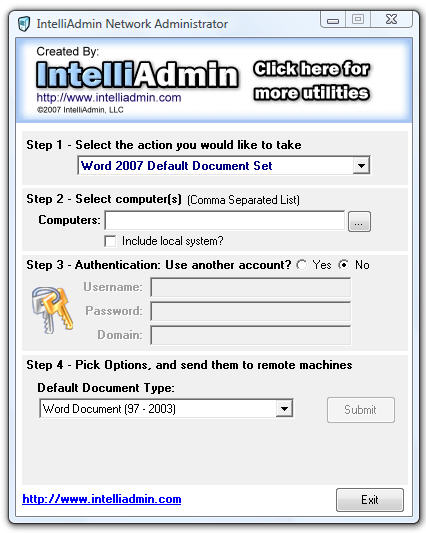
Both of them can be obtained by visiting our download page
One more thing…Subscribe to my newsletter and get 11 free network administrator tools, plus a 30 page user guide so you can get the most out of them. Click Here to get your free tools