
Previous Posts


Unofficial Windows 2000 Daylight Saving Time Patch...

The Progression of Vista through screenshots

Microsoft to release 8 new patches on January 9th

32GB Flash drive for notebooks

How to run an external program within VB Script

VMWare releases Vista compatible beta

Pre-Register for Longhorn Beta 3

Commodore 64 Commercials

Microsoft releases requirements for Vista machines...

Nec to sell waterproof laptop


Archives

May 2005

January 2006

April 2006

May 2006

June 2006

July 2006

September 2006

October 2006

November 2006

December 2006

January 2007

February 2007

March 2007

April 2007

May 2007

June 2007

July 2007

August 2007

September 2007

October 2007

November 2007

December 2007

January 2008

February 2008

March 2008

April 2008

May 2008

June 2008

July 2008

August 2008

September 2008

October 2008

November 2008


Subscribe to our Feed:


Tweak your recent documents list

If you like this article, then sign up for our email newsletter to get more like it every day in your inbox

The recent documents list in Windows XP can be convenient. By default it is set to save the last 15 documents. Microsoft never provided an easy way to change the number of documents.
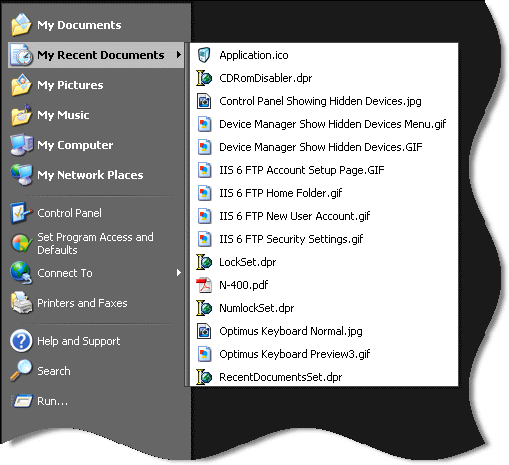


To change the number of documents saved you will need to change a registry key:

HKEY_CURRENT_USER\Software\Microsoft\Windows\CurrentVersion\Policies

You will need to add a dword value of MaxRecentDocs - and set it to the number of documents you want to keep on the list.

If you don't want to mess around with the registry, use our utility to set it for you.
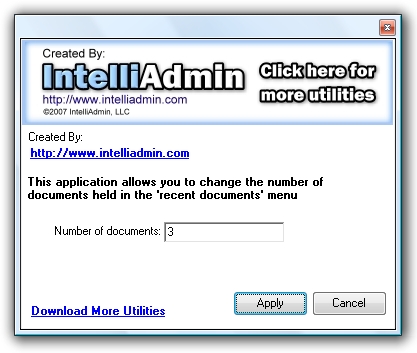

Recent documents set screen shot


To download it, visit our downloads section


Posted By: Steve Wiseman on Monday, January 15, 2007

Check out our utilities for windows


Copyright © IntelliAdmin, LLC, 2008. All Rights Reserved