
Many times a UNC path does not work properly in a command line bat file. This is a hold over from DOS, a compromise to ensure backward compatibility.
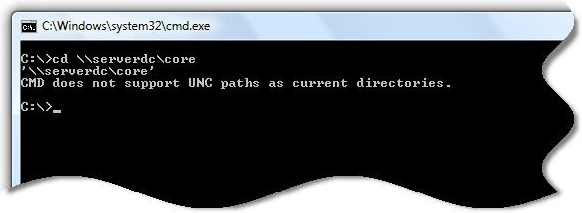
I have found a little known command (At least to me). Actually there are two of them.
PUSHD, and POPD
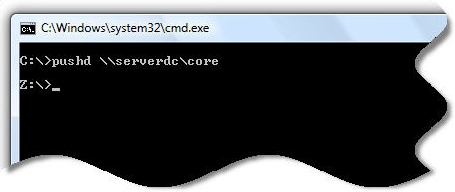
Call PUSHD with a UNC share as a single argument and it automatically maps the UNC share to a drive letter. (It starts at Z: and moves backward). So, if we wanted to run a few command line programs within our share we would call it like this:
pushd \\server\share
command1.exe
command2.exe
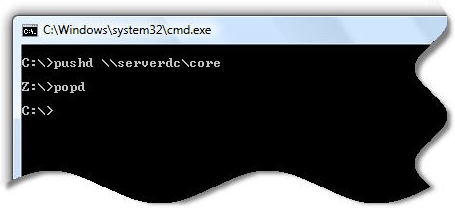
When you are finished, and want to remove the mapping you call popd. Putting it all together we have this:
pushd \\server\share
command1.exe
command2.exe
popd
I have tested this with Windows NT 4 SP6, and it works all the way through Vista…so you are safe using it on any of these versions of Windows.
One more thing…Subscribe to my newsletter and get 11 free network administrator tools, plus a 30 page user guide so you can get the most out of them. Click Here to get your free tools
{ 21 comments… read them below or add one }
Thanks! This worked perfectly when using batch files in XP Mode from within Windows 7 (I had to use it to run Fortran, long story 🙂 )
Thanks Steve!
It did the job also for me too.
Now, the Windows Task Scheduler is able to run my batch job to copy files from a network drive to a Sharepoint share.
Ciprian.
Won’t map a drive for UNC paths deeper than 2 folders.
Why?
Hii, thanx a lot
dis worked perfectly for me in my project.
THX a lot … you’ve saved my life 🙂
this works fine for me 🙂
no this did not work
you click on the batch file script6.bat
which is in \\defile1\apospay
‘\\defile1\apospay’
CMD.EXE was started as the current directory
UNC paths are not supported. Defaulting to Windows Directory
SIMPLEST BATCH FILE –> Follows
pushd \\defile1\apospay
“C:\Program Files\Ipswitch\WS_FTP Professional\ftpscrpt.com” -f \\defile1\apospay\script5.scp
popd
GREAT ONE!!!!!!!!!!!!
This isn’t a hold over from DOS, it’s like by design to avoid potential problems from launching processes from a UNC path and closing the console with the process still running.
It’s also something that can be turned off:
http://support.microsoft.com/kb/156276
Awesome information. Thanks!
This command worked like a charm to me while working with UNC share. Thanks for sharing!!
Nice! Thanks.
Thanks a lot
Great, thanks!
It works! Great!
WELL…. but if it s asking login credentials , how can i give it…?
@Habeeb, try cmdkey!
Hi
I want to execute inventory software (network share).I want to execute this client with domain admin rights i.e slient installtion with out any interaction with users.
How can I use u/n and p/w with this for slient installtion
THANK YOU!
None of the other sites i visited that talked about the net use command mentioned the pushd and popd which are hugely useful.
I was looking high and low for a net use command and this is the only site where I found the pushd and popd.
Thank you!
Vicki Brown
Unfortunately for me, I am trying to access a shared db from a ftp server. I can access the db by supplying the credentials of the ftp server. By using pushd and popd, it gives the error saying the “the network path not found” Is there a way around this?
Thank you for the pushd and popd! All the other developer websites had examples with net use…something the Sr. IT person did not want to use.
cheers!