
I was pulling my hair out the other day when I wanted to blind carbon copy someone an email. If you have never used it before the BCC field allows you to send the message to multiple recipients without revealing who you sent the message to.
For example if I sent a message to Dave, and Sally, and BCCed Mark…Then Dave and Sally would know they both got the message…but would have no idea that I also sent it to Mark.
Here is where the frustration is. I start a new message and the BCC field is just gone
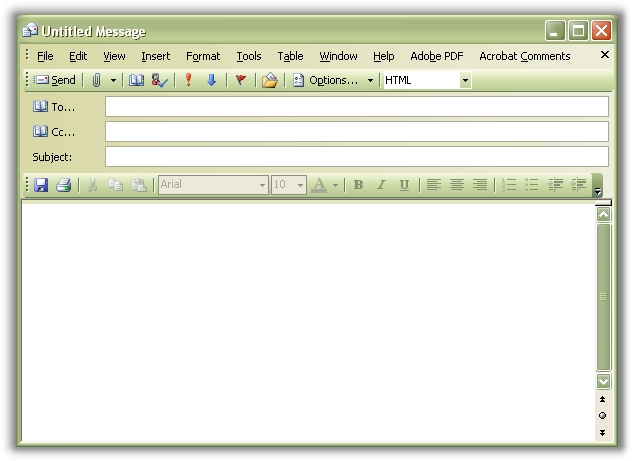
I felt like I clicked every option and every menu and I could not find a way to get it back. For a while I thought maybe for some crazy reason Microsoft removed it from this version of Outlook.
Then I accidentally clicked the little arrow next to options…no not the options button (That brings up a totally different window)…but the little arrow next to it!
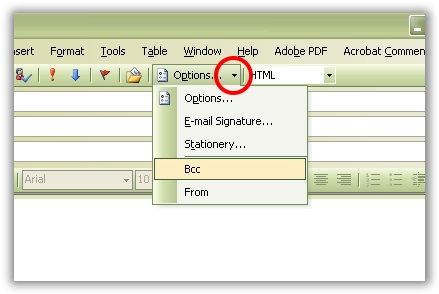
Doing that brings down the menu that allows you to easily add the BCC field back to your email. Clicking on BCC adds it below the others
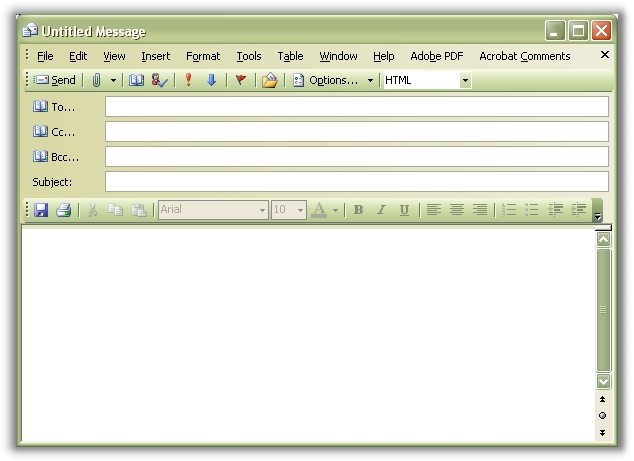
The nice part is you only need to do this once, and now every time you create, or open a message the BCC field is there.
One more thing…Subscribe to my newsletter and get 11 free network administrator tools, plus a 30 page user guide so you can get the most out of them. Click Here to get your free tools
{ 22 comments… read them below or add one }
Great, problem solved!
Easy when you know how!
I’m having a different problem with the Bcc field in Outlook 2003 running under Windows 7. My cousin uses the Bcc field exactly the way you described it on your website, so that we recipients don’t see all of the addresses that she’s sending the message to. Under Windows XP, when I received the message, Outlook translated the Bcc field into “Undisclosed-recipients,” which appeared in the To field, the Bcc field was blank, and the message and attachments were perfectly fine. Under Windows 7, both the To and Bcc fields are blank, and the message includes all of the routing ind other HTML commands and formatting, making it completely unreadable. I have installed Office 2003 SP3 under both XP and 7, and yet Outlook has this problem under 7 and not XP. Is there another fix for this so that it will translate the addresses properly under 7?
Thank you for any help you can give me with this issue.
hi thanks
Hi…Cristal clear information!!! thank you so much!!
gr8! …thanks
Terrific! I wan pulling my hair out too!!
THANK YOU!!! I, like you, was pulling out my hair also….your explanation made it soooooo easy! Thanks again!
Thank you very much…i was in the same situation…but now problem solved
Fab thanks…
Thanks buddy
THANK YOU!!!!! I could kiss you! I’ve been hitting every button, choice, etc. for over 3 weeks.
God.. thanks. i was searching here and there to find the solution and finally i got it here 🙂
thank you very much…you explain with screen shot very easily
Thanks! But now, how does one see the bcc line in their own email? I sent an email with a bcc recipient, but can’t see the bcc line…so, later on, when I check back on this email, I will not know that I included a bcc because it does not appear as it should!
Thanks..
how to get the sort header (i.e) sort by subject / receive / from
Thanks.
It Helps me, i don’t need to call IT Guys , for so called favor.
In fact it was so simple.
Thank you so much. I was going mad trying to resolve this. Other sites gave all sorts of incorrect solutions, which i tried. I tried absolutely everything! Even Microsoft seem to giving out the wrong information. What a stupid place to hide From and Bcc!!! Thanks again!
Brilliant, thank you for this.
Hi,
very usfull & easy steps
many thanks Appreciate
Rgds
yasir
Thanks. Microsoft just ceases to impress on how many new ways they are able to find to frustrate users. So much thought and design work must go into it.
Thank you thank you thank you. Why can no one else answer questions like that?