
One of my major hangups with vista is the ‘Search Bar’. When I first started using Vista I felt that Microsoft had done a great thing – They made it so I could launch my favorite program with one click instead of two.
I was quickly disappointed to find that when you type a word into the search bar it is nothing like the old Start->Run command bar window. It starts searching for the words you type in, and many times you need to wait…and wait…and wait some more.
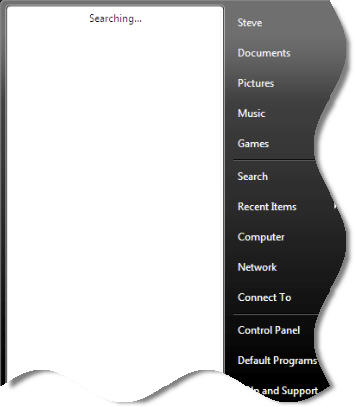
Additionally if you are like me…and have an old habit of clicking start, then run, then type c:\ to open up your hard drive…you are in for lots of fun with the search bar. Depending on what it finds it will almost never open your hard drive in explorer.
I found a few quick ways to ease the pain. First of all you can simply hold the windows key + R to bring up the command line window. That is the easiest.
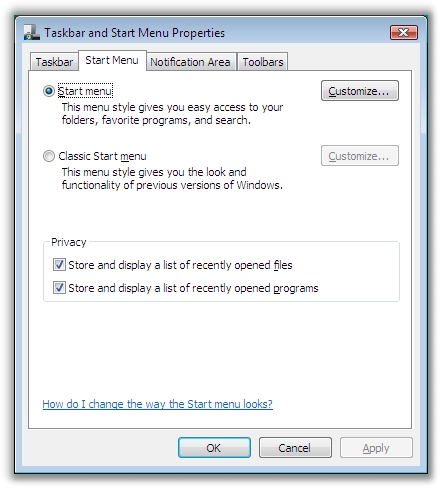
You can also get the run command back on the start menu. This can be done by right clicking on the start button, go to properties.
Move over to the “Start Menu” Tab and click customize.
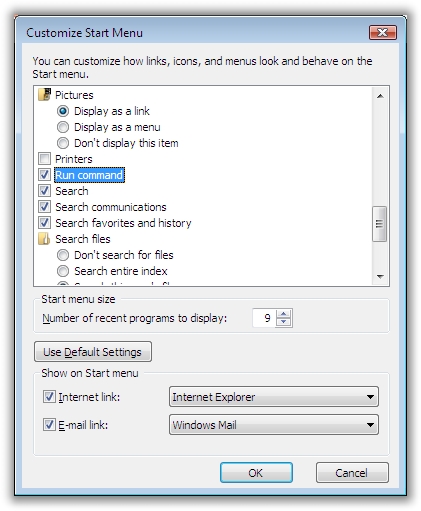
Now scroll down. Find the option that says “Run Command” Make sure it is checked, and click OK.
Now the run command will be added as an extra button to the bottom of the start menu:
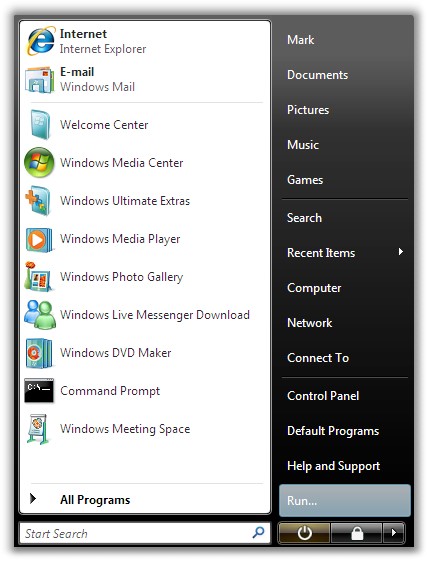
Now I can get to back to my familiar old ‘run’ command line.
One more thing…Subscribe to my newsletter and get 11 free network administrator tools, plus a 30 page user guide so you can get the most out of them. Click Here to get your free tools