
After creating the IE 7 Tweaking tool we seem to get loads of questions about IE 7. One of the latest was about setting multiple home pages in IE 7 from the command line. Hmm. Before someone asked I never had thought about it.
If you look into the settings of IE 7, you can easily add more than one home page. One URL for each line. When you open IE, these will all be launched in their own tab.
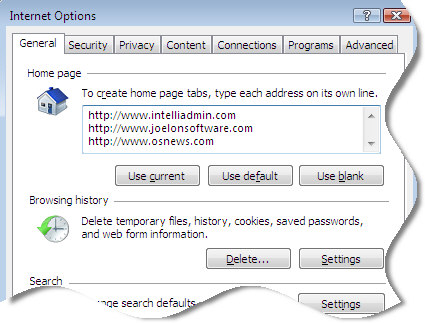
I added some websites, and then I dug into the registry to see what was changed. Here is a snapshot:
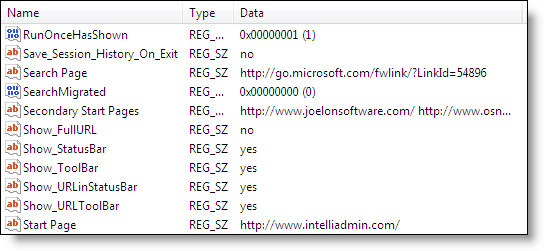
That there are actually two parts to the home page setting. They are both under HKEY_CURRENT_USER\Software\Microsoft\Internet Explorer\Main
The first website to be displayed is stored under the string value named:
Start Page
The rest of the websites displayed are stored in a string array value named:
Secondary Start Pages
The first string is very easy to script and change.
The second is not as simple. This is because it is an array of strings separated by NULL characters, and terminated with two NULL characters.
There are a few ways to do this. One way would be to update one machine with all of your desired settings…and create an exported reg key. You could then use regedit in silent mode to import the settings on other machines.
This has its downfalls – if not done right you could accidentally pull in other values you don’t want thrown around to every machine.
Another way would be to use VB Script. I wanted something cleaner, and an excuse to start using our new internal API for writing cross-compilable software (64 and 32 bit). I came up with this little command line program named IESetHomeTabs.exe
Here is how you call it from the command line:
C:>IESetHomeTabs.exe “[URL1]” “[URL2]” “[URL3]”
So if I wanted http://www.intelliadmin.com, http://www.slashdot.org, and http://www.technet.com as my 3 tabs I could call it like this:
C:>IESetHomeTabs.exe “http://www.intelliadmin.com” “http://www.slashdot.org” “http://www.technet.com”
Here are the links for downloading:
i386 Version
AMD 64 Bit Version
We have been looking for a place to order an IA64 machine without seeing the $CALL. I suspect there is a commissioned based sales person on the other side. If anyone knows of a HP or Dell IA64 machine that can be easily ordered…please let me know, and we will then be able to provide an IA64 version of the utility too.
One more thing…Subscribe to my newsletter and get 11 free network administrator tools, plus a 30 page user guide so you can get the most out of them. Click Here to get your free tools
{ 1 comment… read it below or add one }
Just tried and used your software and it does exactly what I need from it, I havent yet tried it on a machine with a locked down shell… will let you know how that goes.
Top work, cheers!!!!!