
Over the past few years I have received many emails asking what the admin$ share is used for, and what are the security implications when using it.
This share has been present in all of the “NT” versions of windows. This means Windows NT 3.1, 3.5, 4.0, 2000, XP, 2003 and Vista.
The share is part of a few that are automatically created in windows. Another is c$. Why do they end with a $ ? This is used to tell windows to hide the share. For example, if I browse to my desktop from my laptop over the network…this is what I see: (I clicked start, then run and typed \\laptopsw – the name of the laptop)
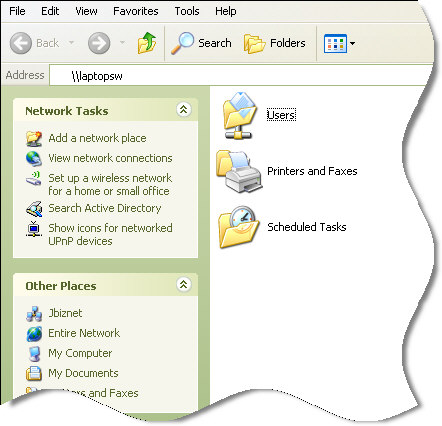
Now looking at that you would think that the only share available on that system is “Users”.
Not true. We can browse to our hidden share by typing the full path into Explorer:
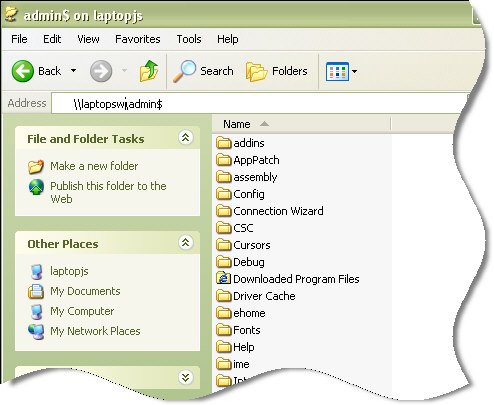
If you look carefully you will notice that the admin$ share simply points to the C:\Windows folder.
So what is this for? And why did Microsoft put this into Windows?
Specifically it is used to deploy software remotely. If you have ever ‘pushed’ software to a computer across your network, then you have used the admin$ share.
When software is pushed, it uses this share to upload the file.
Here is how it works.
1. You connect to the remote machine’s admin$ share. If you have local administrator rights, then you connect right away – otherwise you are prompted for a username and password.
2. You copy over a file, or files to the remote machine. To execute remotely, one of those files must be a service.
3. The service that was copied in step 2 is installed, and started.
4. Now your software has been pushed.
Obviously the admin$ share could be used for many other things. Anything that can be set in windows by changing a file in c:\windows can be updated in this way. Or more nefariously a virus could use this share to propagate across your network.
In earlier versions of windows, the admin$ share was wide open. There were numerous vulnerabilities in NT 4, and 2000 that gave it a bad name. Mostly it was not an implementation issue, but an issue with the local administrator password. Many administrators simply left it blank!
Zoom back to today, and we are in a totally different environment. Microsoft has locked down file sharing significantly. A few rules are now in place that can keep the admin share, and all file sharing from working properly.
Here are some of the new restrictions (Mostly on XP SP2 and higher) on file sharing:
1. Windows will not allow connections using accounts that have no password. It simply will keep asking you for the password as if you entered it incorrectly.
2. The hostname must be correct. For example, the hostname of the machine is LAPTOPSW, and you create a host entry pointing to the same ip called MYLAPTOP. Now if I attempt to browse to the machine using that new hostname…I will be denied access.
3. In a similar situation to number 2, if I try to use the IP address, I will be denied access. It will simply keep asking for the username and password as if I typed it wrong.
In addition to those new rules, Microsoft ships Windows XP with a feature called “Simple File Sharing” (Turned on by default)
Simple file sharing should be called “Broken insecure file sharing”. When this feature is turned on you have no admin share – and that is a good thing. Why? Because all other shares have no security and no passwords. No choice.
This is burned into XP Home, no way to turn it off.
So step 1 to getting the admin share working properly under XP SP2, is to disable simple file sharing. I have an article on the subject if you are interested.
An additional roadblock is the firewall built into XP. By default it disables all access to file and printer sharing. This needs to be turned back on if you want to access the admin share. The article I linked above shows you how to do that too.
Still, I can feel your concern. Why turn all this stuff back on when MS thinks it is a big security hole?
To give you a choice. If you are not aware of it, then the default is to lock down. This is a good thing. The risks are:
1. Blank passwords, or simple passwords. Any password that could be easily guessed by a virus roaming your network would be bad. Pick hard to guess passwords for your administrator accounts. I have seen viruses that have 10,000 of the most common passwords built into them so they can try to get in that way.
2. Direct internet access. If your computers are safe behind a firewall, then you can feel safe in the fact that only other local computers can access your share. If your computer is going to be directly connected to the internet I would never allow traffic for file and printer sharing.
3. Make sure you have adequate anti-virus installed. Since your attack surface has been reduced (You only need to worry about machines you know on your network, and not the entire net)…A good anti-virus on every machines is the best defense against viruses propagating using the admin share.
4. Limits on the administrator account. Very few people should have, and should login as a domain administrator. The less that do, the smaller the chance that the admin share can be used for bad purposes.
So if you know the risks, properly secure your computers, and use some common sense – you can enable the admin share, and enjoy the benefits of using it.
One more thing…Subscribe to my newsletter and get 11 free network administrator tools, plus a 30 page user guide so you can get the most out of them. Click Here to get your free tools
{ 2 comments… read them below or add one }
Hello, I am testing the C$ access over my open network.
When I hit the home key + r to open the menu.. I then type \\”IP-Address”\
after that I am granted access to see any files shared publicly and I have seen pictures and music from someone else on my network.
When I do the same thing but add C$ at the end.. it takes me to a screen and asks for a Username & Password to gain administrative access to that computer (to ssee the full C: drive etc.)
I obviously don’t know the password because its just someone hopping on my network. Is there any way to get around that and let myself gain Administrative rights to theyr Laptop from mine?
Hope you can help.
Thanks
MAckalee
mackaleesinclairr@hotmail.com
Nope. You need the admin username and password, or you can’t get in.