
I ran across this last week while helping a bank determine what Windows patch broke one of their internal applications. This meant I was manually installing different patches one by one (Including SP2 for XP) – and looking for them on Google. In one of my searches I came across this search result:
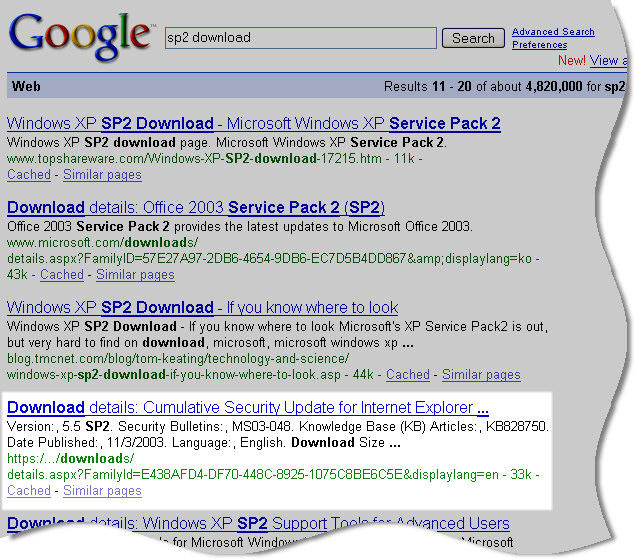
Now looking at the highlighted result…can you see anything wrong with it? No, I can’t either.
Now look at the page you get to when clicking on the link:
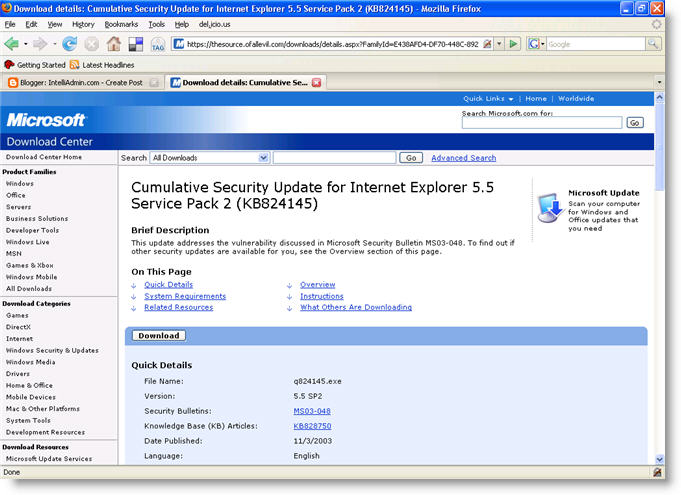
Now obviously I do not need SP2 for IE 5.5. Still…this is is bad. Why? Looks like a MS page right?
Look at the URL at the top of the browser:

Ugg. After some more poking around it looks like thesource.ofallevil.com has an exact mirror of the MS website. I have not tested any of the executables for viruses, or spyware – but for some reason I don’t think they have good intentions in mind for you or your network.
I have stopped searching for MS patches on Google, and started looking for them directly on the MS website. I suggest you do the same.
One more thing…Subscribe to my newsletter and get 11 free network administrator tools, plus a 30 page user guide so you can get the most out of them. Click Here to get your free tools