
Microsoft has just released Windows SteadyState. It is a free program that allows you to lock down a Windows installation, and make it suitable for use in a public environment.
It is actually a major upgrade (So major they renamed it) from an older tool called the Microsoft® Shared Computer Toolkit for Windows XP.
A few features that make it much more attractive than the older version:
-You don’t need to repartition your hard drive to take advantage of the hard drive protection features
-User settings have been simplified to a high, medium, and low setting for each account.
-It enables you to import and export user accounts from one computer to another
-It includes a fully-revised Windows SteadyState Handbook
I decided to take it for a quick test drive, and one of the most compelling features is the hard drive protection.
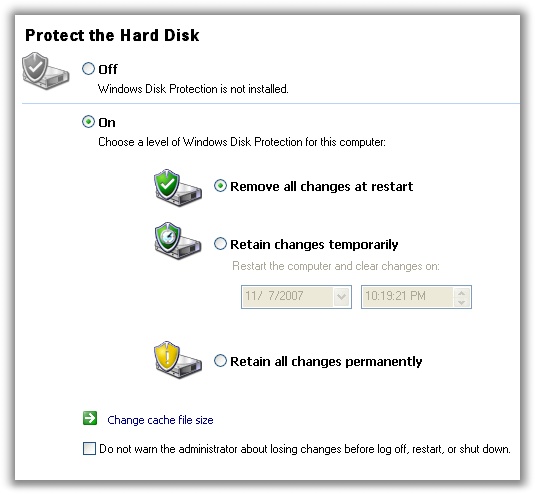
This is great. Even if a script kiddy takes over my kiosk and vandalizes the thing, I can set it to refresh back to my original configuration after a reboot.
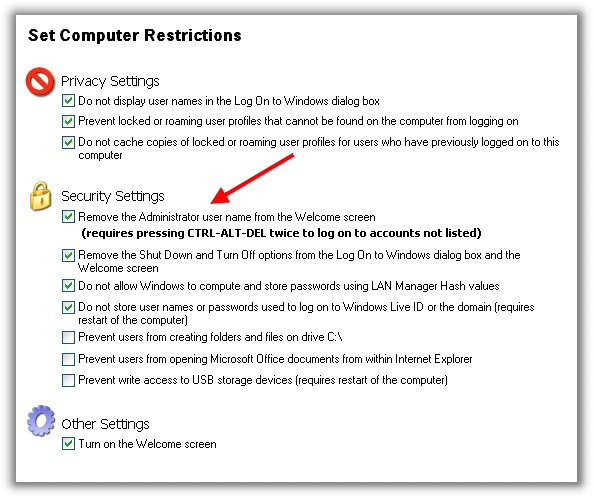
Another nice feature is the ability to hide the administrator account from the welcome screen
All in all, this program is packed with features, and provides a level of functionality I had only seen previously in expensive third party products.
Best of all, it is free. Download from Microsoft
One more thing…Subscribe to my newsletter and get 11 free network administrator tools, plus a 30 page user guide so you can get the most out of them. Click Here to get your free tools