
I had a reader write me a few days ago:
…I’m in a school environment and a student has deleted some files and I would like to know how I can do this in Win2k server to catch this sucker. Please advice and more power to you.
This can be accomplished through auditing. Lets start out by identifying what folder we want to watch – and be careful where you turn on auditing…turn it on too many folders with too many options and you can have huge performance issues.
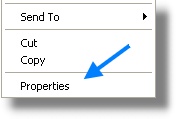
We find the folder we want, and right click on it and go to properties
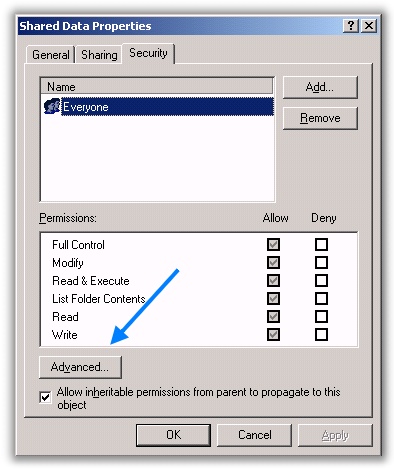
This will bring up the properties page for the folder. Move over to the security tab, and click on the advanced button:
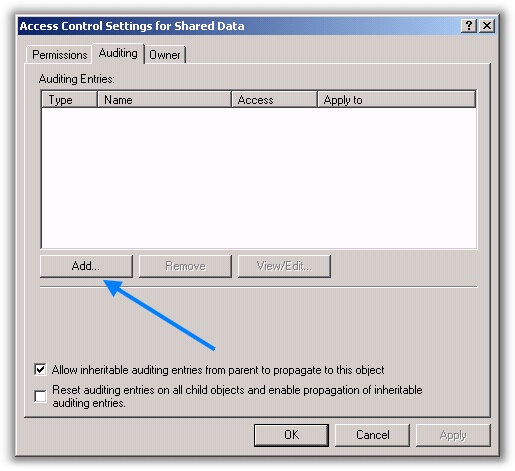
The advanced page will appear. Click on the Auditing tab, and click the add button:
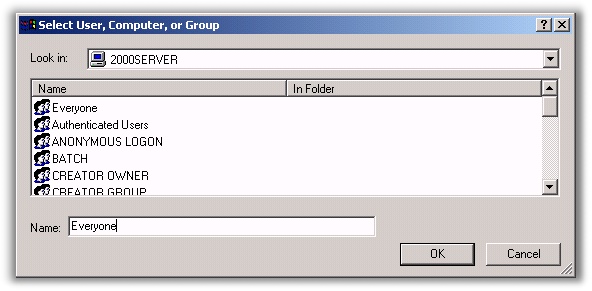
A user dialog will come up. I chose to put the “Everyone” group here. This allows me to audit for any possible user account that may be deleting files. If you think you know who it might be…you could put those users here instead. The smaller window of users being audited means better performance.
Once you click OK, a selection box will be displayed. Again – chose only the options you need. Each additional option will reduce performance. Here I just pick the options to audit deleting files and folders
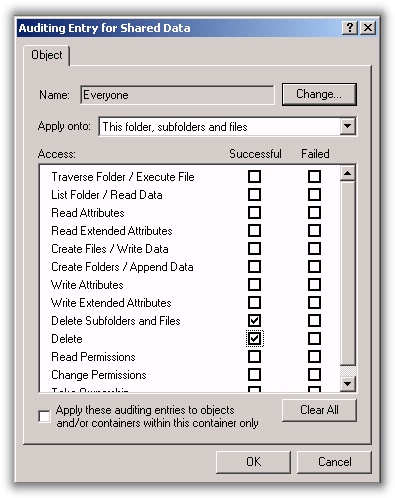
Click OK through all of the windows you have open. If a user deletes a file or folder Windows will write an event to the security log.
Now. We have our auditing turned on, and you get to work one morning and find that files are missing. Simply open the event viewer and move over to the security log. Look for the event ID 560:
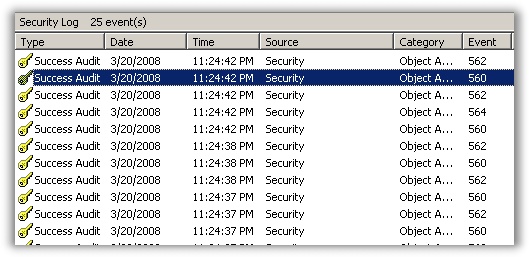
Double click on the event, and you will need to sit there and read it for a little bit to determine who did what. Here is an excerpt from mine (I copied the text from event viewer to notepad for easier reading)
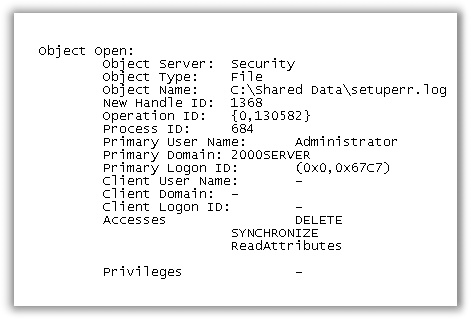
We can see from this log entry that the user Administrator deleted the file setuperr.log
Now when someone deletes a file, you will have no problem determining who did it.
If you have a windows administration question, or an idea for a utility please send me an email at support@intelliadmin.com. I can’t promise that I will answer every email, but I try to read them all.
One more thing…Subscribe to my newsletter and get 11 free network administrator tools, plus a 30 page user guide so you can get the most out of them. Click Here to get your free tools
{ 28 comments… read them below or add one }
is this applicable with in a domain?
Steve Says:
Yes, this will work in a domain environment also
Is it possible to put an intervention before moving the folder like “do you want to move or copy files from this folder. by doing this the user has to reply yes or no before the folder moves.
Thanks,
No. You would need to disable read, write, or delete permissions to do what you want to accomplish.
Thanks for the instruction above but this setup is for future incidents.
I have a file that was already deleted. How can I track down who deleted my directory/file? I was able to recover them from my backups but I need to track down who did it. Audit was never turned on.
I don’t think there is any way to know who deleted it. Without auditing turned on, there are no logs of who deleted the file.
Thanks Steve!
Pay attenction that this log is write also if you create a folder. Where you read delete is the type pd permission not the action that the users made
My concern is to monitor who, what and when a certain file/s was deleted in a shared folder inside a domain controlled invironment. I have done the above instruction with the CPU that has the shared folder (local) and tried it by copying and deleting files inside the monitored shared folder from a remote CPU with an iterval of 10 sec from copying to deleting. Then i went back to the local computer and open the local event viewer. Their was no 560 in the Event ID during that time, most are 538 and 540. Is there any thing else that i may have left undone, or should i do something more in configuring this utility. This is a very hekfull utility and i realy would like to use it, Please help.
Thanks in advance,
jojie
Did you disable auditing via group policy? That would cause auditing to fail if configured locally.
auditing needs to be on in two places. server (an Mark indicates) and file/folder (as this article describes). look for 560 (has file name) and 564 (delete confirmation) together to confirm the delete.
http://support.microsoft.com/kb/174074
JC posted the wrong KB: http://support.microsoft.com/kb/325898 will tell you how to turn on auditing for the server, then you will need to follow the above blog post for a particular folder.
Awesome – Thanks for the link!
This shit does not work. It just fills my sec.event log with events 560 and 562 but it does not tell me the folders I deleted.
Use Netwrix. You’ll have to pay for it though. The file/folder monitoring starts at $85 per server.
I filter for event 4663 which has both username and filename.
Thanks for the post Devin – great suggestion.
Hi, how to check, who delete windows 7 profile.
I don’t think there is a way to do that….unless you have auditing on the system files..even then it might show up as ‘system’
hey steve its not working for me i am using windows 2003 and domain controller, the event log will take any prefer time to update the database ?
It should work almost right away. The usual ‘gotcha’ is the user accounts that you pick for auditing. What accounts did you specify? The exact account names, or a generic group like “Domain Users” or “Everyone” The latter two seem to have trouble with auditing. I still am not sure why, but they do not show up.
hey i used everyone and also particular group where all the users listed but still its not working … we need to do any update on AD?
I have added auditing to file locations yet I receive no events with an ID of 560 or the mentioned 4663.
Running Win7-64bit, I am wondering if the event ids changed. The only event IDs I have in my “event viewer>windows logs>security log” are 4611, 4624, 4634, 4656, 4658, 4672, 4673, 4701, 4702, 4907, 4985, 5140, 5145, 5156, 5158, and 6281.
Am I looking in the wrong place or is there an additional setting that I need to check?
Hello, Does it work for workgroup with windows server 2003 standard R2? Does we do before delete file? I did already but it does not work. Thanks
Looks ok. Doesn’t work on Windows 2008 server. Such event id 560 won’t be there.
id 4656 (win 2008) = 560 (win 2003)
and other id (on russian)
http://support.microsoft.com/kb/977519/ru
Thanks for the updated info Andrei – really appreciate it!
And in English 🙂
https://support.microsoft.com/en-us/kb/977519