
Service Pack 1 for Vista was released a few weeks ago. For now, it is an optional update. Beginning mid April, SP1 will start automatically downloading to PCs – Only on machines that have automatic updates turned on. Not to fear, it will download but not install automatically.
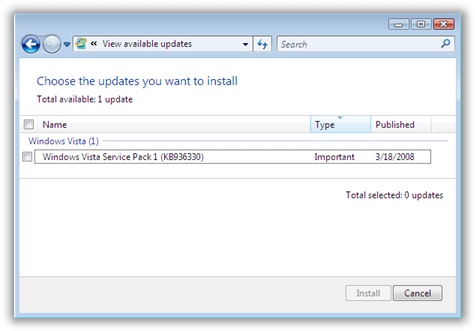
If you are not familiar with the new layout of Automatic updates, you can see if it is available for downloading by opening Internet Explorer, click on tools, then Automatic updates. It will bring up the Automatic Update application. Click on the link that says “View Available Updates”
If SP1 is available, it will look something like this:
If you want to try it out now, but you still do not see it in your list of optional updates there are a few things you need to check:
-You have a pre-release version of Vista. If you do, you need to uninstall windows, and install a fresh full release.
-You already have it. To check, simply go to the start menu, and right click on computer and go to properties
-SP1 is only available in these languages: English, French, Spanish, German, and Japanese. If you have another language version of Windows installed, it is not available yet
-Windows update has detected that you have drivers that are problematic with SP1. If this is the case, SP1 will not show up in your list of updates (No way we know yet to determine if this is the case)
-You are missing pre-requisite patches needed. Simply keep running automatic update until you are fully patched.
We are still testing it out here ourselves…we can’t recommend for or against it yet. I think many of the fixes will be invisible to most – since their major focus for SP1 was driver incompatibilities.
One more thing…Subscribe to my newsletter and get 11 free network administrator tools, plus a 30 page user guide so you can get the most out of them. Click Here to get your free tools