
I have been toying around with different configurations here using the free VMWare server package. I decided I would take another look at the Microsoft VM solution (Now known as Hyper-V)
In the past I have been underwhelmed by the truly abysmal state of Microsoft’s Virtual Machine server software. Last time I tried it out I believe it was called Microsoft Virtual Server 2005. I had so much trouble getting it to work I vowed to never allow it on my system again – in fact Virutal Server caused so much trouble I had to reformat and reload the host PC that I had installed it on.
Come back to today…three years later. I was installing a fresh copy of Windows 2008 as a new domain controller. I saw the option to install Hyper-V, or not to install it. I figured I would give it a spin (And work on my new DC later)
I ran automatic update right after my fresh copy of Windows 2008 was installed. This brought me from a pre-release version of Hyper-V to the final version. Once my updates were complete I opened up the server manager and drilled down to the Hyper-V section
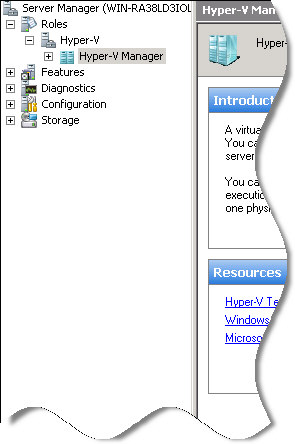
Clearly, there were tons of options. This is when I started to realize that Microsoft may finally have something that will give VMWare a run for its money. I hate to say it, because I really like VMWare.
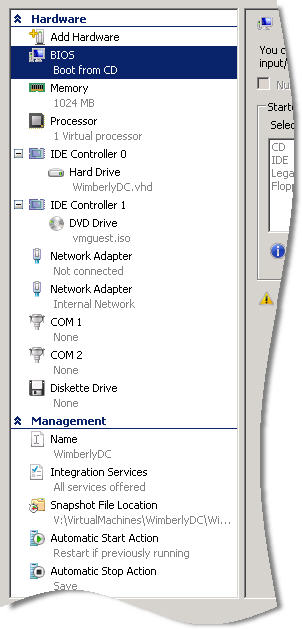
Two things that I wanted together – multiple snapshots, and the ability to manage virtual machines remotely. It has both, and it does them quite well.
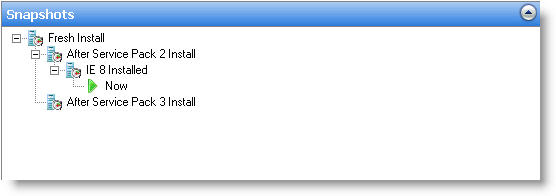
As you can see in this screenshot you can have different snapshot paths. This is a great feature when you need to test against multiple service pack levels. So now I can test on many configurations without much effort – or expense.
In addition, I can remotely manage my virtual machines.
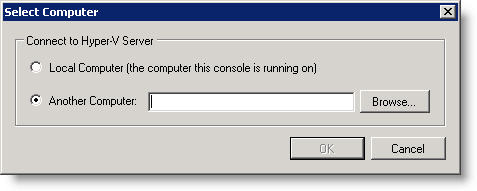
Yes VMWare has both of these features, but to get remote management and multiple snapshots in one package you need to purchase the expensive ESX server.
I have not checked yet, but I bet I can get a Hyper-V client of some kind to work on a Vista machine. This would be perfect for connecting to it from our underpowered laptops.
If I wanted the same functionality in VMWare I would need to run ESX (Which is expensive) or run all of the VMs on my local machine – something I don’t have the horsepower to do. So with Windows 2008 and Hyper-V I can get what I want without purchasing anything extra. We can put a quad core system with tons of memory and hard drive space, stick it in the server room and be able to manage it remotely.
I have used VMWare’s Virtual Infrastructure with ESX and surprisingly in this case the management interface that Microsoft has developed is a lot snappier, and downright easier to use. There are still many features lacking in Hyper-V, but I believe the price factor will decimate VMWare if they are not careful.
If you have a copy of 2008 Server, I would definitely suggest giving Hyper-V a spin. It may be a lot better than you expect.
One more thing…Subscribe to my newsletter and get 11 free network administrator tools, plus a 30 page user guide so you can get the most out of them. Click Here to get your free tools