
.
From time to time I have accidentally typed in the wrong address in Outlook. To make matters worse the wrong email address comes up every time when I start typing.
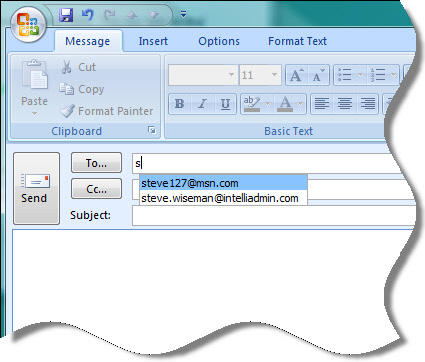
I searched for quite some time trying to figure out how to remove items from the list – until finally I discovered the obvious.
To remove an item from auto-complete simply select the address with the cursor keys, and press the delete key. Poof the entry is gone.
One more thing…Subscribe to my newsletter and get 11 free network administrator tools, plus a 30 page user guide so you can get the most out of them. Click Here to get your free tools
{ 5 comments… read them below or add one }
First of all, finally you guys have comments on your blog! It is about time. Secondly I looked for how to do this for the longest time, and could never find the answer to it. So simple I should have figured it out 🙂
Thanks for pointing users to the new rss feeds.
No thanks for not telling us that the new feeds are *not* full feeds and we are thus now forced to visit the site to view the full articles.
It was an oversight. I am looking for a way to turn it on right now
It doesn’t work for me – I start typing the address, and a list of email addresses pops up for autofil. I cannot select anything with my cursor. If I click on it, it fills in the address. If I hit delete, it just deletes that first letter I typed in in the address field. I can’t capture it – either with my cursor or with my mouse – and delete it – please advise.
Thanks man. I have been in the IT industry for some years and when my boss asked me to figure this small trivial task out, I was stumped. lol. I’m glad this page came up first in my search engine.