
A while back we published an article about disabling USB drives. It included a little program that would make the registry change for you.
We took it one step further this week. We just released our free remote USB disabler. It only disables storage devices. USB Mice, keyboards, scanners will still work fine when this is in place. You can disable, or enable USB storage devices across your network.
It is small enough to fit on a floppy, and does not need any 30MB .net runtimes, or DLLs. It works without an install.
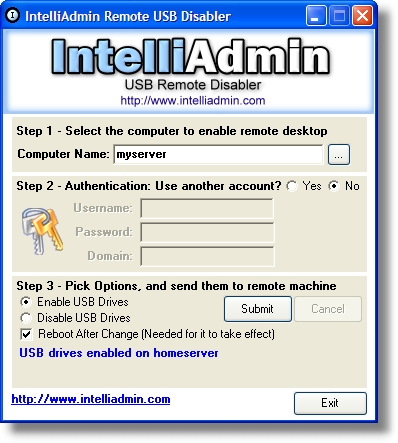
You can download it from here – as always no spyware, adware or junkware – only freeware goodness
One more thing…Subscribe to my newsletter and get 11 free network administrator tools, plus a 30 page user guide so you can get the most out of them. Click Here to get your free tools
{ 4 comments… read them below or add one }
Hi,
I tried using the USB block tool. It was successful in windows XP but unfortunately failed in Vista. The user still can access the USB drives. I disabled the access and restarted the machine remotely. But after the restart, user still can access USB. Could you please suggest something?
its very usefull tool for network administrator
I’m looking for a programmable USB port enabler/disabler, one that I can set to turn one or all USB ports on and off based on time of day. Do you have anything that can do this or can you tell me where I could find one?
Thanks, Lou
Hi Lou,
That is an interesting idea. USB Disabler can’t do anything like that at this time, and I don’t know of any program out there that can do this.