
Remote desktop is a nice feature of Windows 2003, XP, and 2000 server that lets you remotely login to, and work on the system as if you were there. Many times you find that you need it enabled – but the machine you are trying to access is far across your network where it is tough to reach.
There is nothing within windows that will allow you to enable this feature remotely. We have taken the liberty to fix that.
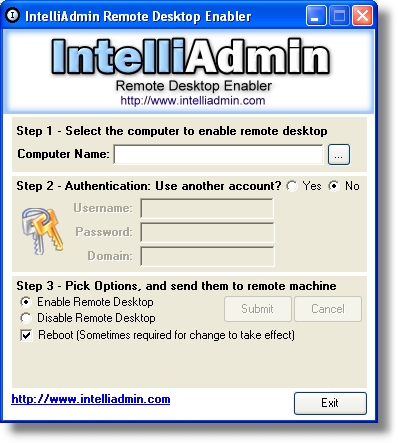
It is a totally free utility that does not need an install, extra dlls or runtimes. Just download from here and immediately you are able to disable, or enable Remote Desktop across your LAN
As always – no spyware, adware..Just freeware goodness.
One more thing…Subscribe to my newsletter and get 11 free network administrator tools, plus a 30 page user guide so you can get the most out of them. Click Here to get your free tools
{ 7 comments… read them below or add one }
The link http://www.intelliadmin.com/RDPRemoteEnabler.exe seems to be pointing at http://ftp.intelliadmin.com/NetworkAdministrator.exe. Is that wrong?
on a hunch I also tried http://ftp.intelliadmin.com/RDPRemoteEnabler.exe but that also downloads NetworkAdministrator.exe
The RDPRemoteEnabler has been merged into Network Administrator – that is why it downloads it. You can download and use Network Admin to do the same thing – only need to purchase if you want to apply to more than 3 computers at once.
You can do this easily by running your regedit on any PC and Conntect to a Remote Registry, select the target server and Edit the HKLM\System\Control\CurrentControlSet\Terminal Server which has a key fDenyTSConnections value from 1 to 0. After issuing a “shutdown” command line with the said server as the target and using the -r option to reboot, that would accomplish the same thing.
googd program
Very useful tool. thanks
when using this Remote Registry, select the target computer ( the computername is displayed) but it is failing to connect. Even to enable firewall remotely it fails as some also said it somehow works.