
It always happens to me. I am working as fast as I can to get something done for the day. I start to print. Behold – Windows has the genius to tell me that yes. YES! It is printing.
Um. Yes I did know that it was printing – since I started the print job. The biggest problem with these notifications is that they always seem to block something down in that corner and keep me from getting to it with my mouse.
This is one of those ‘features’ that should be easy to disable, but in reality it is difficult to find the actual place to turn it off!
After googling for a while I found what you need to do – to get rid of those wonderful print job help balloon’s
First, open up “Printers and Faxes” in the control panel.
Click on File, and then “Server Properties”
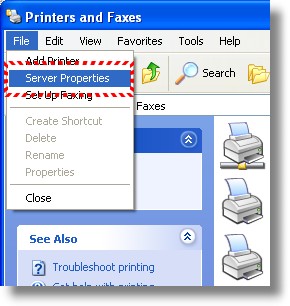
Once this is open, click over to the advanced tab.
Uncheck the “Show Informational Notifications For Local Printers”
And Uncheck the ” Show Informational Notifications For Network Printers”
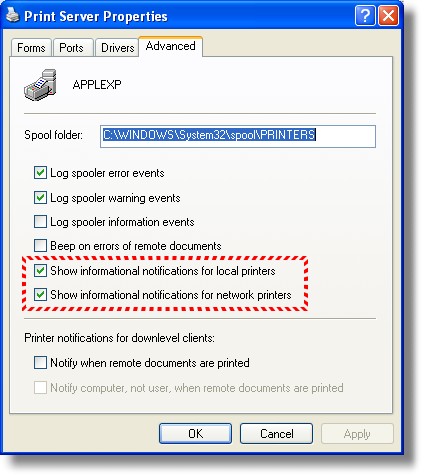
Look at that – not even a registry key to change this time! You should now be free of the pesky printer notification balloons.
One more thing…Subscribe to my newsletter and get 11 free network administrator tools, plus a 30 page user guide so you can get the most out of them. Click Here to get your free tools
{ 2 comments… read them below or add one }
Thanks for the help. Those balloons were driving me crazy, almost. They cause just the slightest delay when I’m doing more repetive tasks. This will really help me.
Thank you!
That has been a continual annoyance. I couldn’t work on the next item until the bubble cleared each time I printed unless I clicked on the “x” in the upper corner of the bubble. What a pleasure not to have to slow down for that useless task many, many times a day.