
I have the latest version of XP Tablet edition. The thing is…I never use the software keyboard that pops up on login.
I only switch to use my pen when I want to scratch out an idea, or write a journal entry. I never use it while logging in so there is no need for it.
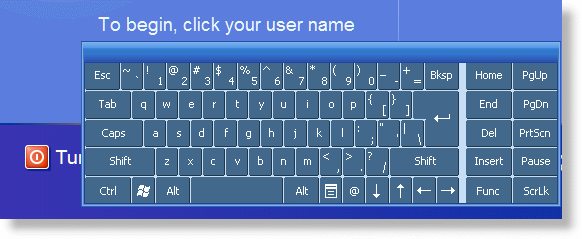
After some searching I found that there is nothing within Tablet edition that will let you turn it off. No configuration setting to be found.
What I discovered is that you can unregister a specific DLL and make it disappear – with no side effects. To remove the keyboard first get to a command line
Now type:
regsvr32 /u “C:\Program Files\Common Files\Microsoft Shared\Ink\loginkey.dll”
For Tablet PC 2005
regsvr32 /u “C:\Windows\System32\loginkey.dll”
If you want it back, you can simply type this on the command line:
regsvr32 “C:\Program Files\Common Files\Microsoft Shared\Ink\loginkey.dll”
For Tablet PC 2005
regsvr32 “C:\Windows\System32\loginkey.dll”
Now if you don’t like the command line, we have written a program that will do it for you (Works under any version of XP Tablet Edition)
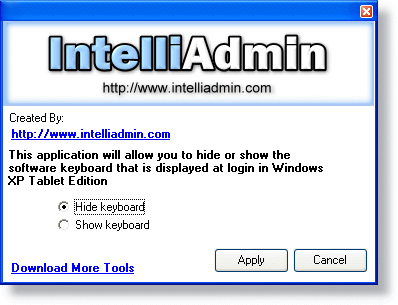
Download it here – As usual, no spyware or adware…only freeware goodness
One more thing…Subscribe to my newsletter and get 11 free network administrator tools, plus a 30 page user guide so you can get the most out of them. Click Here to get your free tools
{ 1 trackback }
{ 2 comments… read them below or add one }
Hi there,
thank you for this very good tip.
As the program did not work in my german xp version, i found the directory as follows :
regsvr32 /u “C:\Programme\Gemeinsame Dateien\Microsoft Shared\Ink\loginkey.dll”
and it worked !
Greetings Werner
Didn’t work for me ;/
Microsoft Windows XP
Tablet PC Edition 2005
Version 2002
Service Pack 2
Guess it’ll be adding keyboardsurrogate.exe to startup from gpedit.msc.
I hate doing that, it feels like hackery. Glad it doesn’t work in modern systems.