
We have just added a new feature to Network Administrator. It allows you to audit and verify that the Daylight Saving patch (For USA and Canada) has been installed. This works for our patch, and Microsoft’s. (It will even tell you when you have the older, incorrect version of the MS patch)
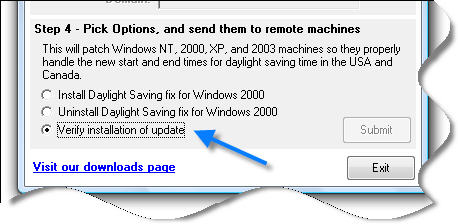
In addition we have added the Dynamic DST settings that Microsoft has recently published, and fixes to the Newfoundland timezone. These Dynamic Settings allow your system to know that prior to 2007 daylight saving time was different. What is it for? Lets say you have a file that was created in 2006 between the new dst and the old dst – your computer would show its time stamp off by an hour (Without it). For most people this is trivial, but it could mean trouble for some applications.
At the same time we have released a new version of our free daylight saving patch for Windows NT, 2000, 2003, and XP.
One thing to note, if you are using the MS patch 928388 you will need to get 931836 to get the proper updates (Or just use ours). Patch 928388 has incorrect changes for the Newfoundland timezone.
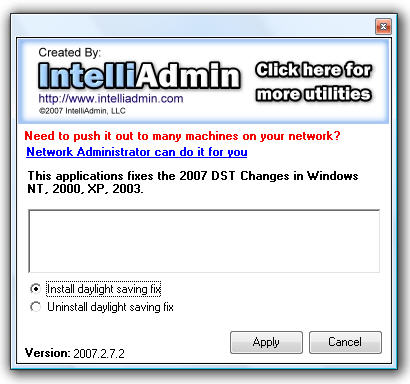
The new patch now shows you progress during the patch, and will only install if Microsoft’s, or our patch has not been installed.
If you have purchased Network Administrator, this 2.5 release is a free update – and we will be emailing all customers shortly about it.
And to answer the most common question about our patch – Yes it can co-exist with the Microsoft patch, no it won’t hurt a machine to apply both.
See our previous article on the subject for more information
To get your hands on the free patch, or Network Administrator – Visit our download page
One more thing…Subscribe to my newsletter and get 11 free network administrator tools, plus a 30 page user guide so you can get the most out of them. Click Here to get your free tools