
While digging around for an answer to another issue, I came across this KB article
Essentially it boils down to this: Windows XP comes with a bunch of pre-loaded software. Lots of it you can’t even find in Add/Remove programs. Why? Because Microsoft designed it this way.
By simply opening up the file Sysoc.inf (This is in the %SystemRoot%\Inf folder), and removing the word ‘hide’ you can force these programs to show up.
You can scan through and figure out what each item is. Some of them won’t do anything for you. For example, even under Windows XP Pro you can turn on Terminal Services. It will show up in Add/Remove components, but you won’t be able to install it.
Lets look at mine. I am going unhide MS Word Pad. Here is what the line looks like:
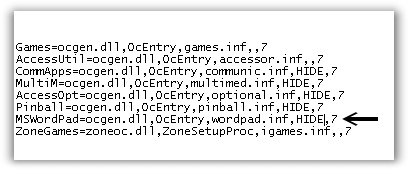
Now I will unhide it by removing the word HIDE and saving the file. It would be a good idea to back up this file before making any changes…that way you can get things back to normal if you mess it up.
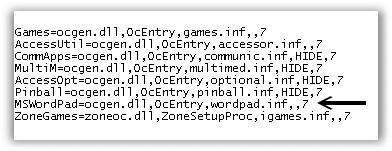
Notice that both commas stay, so you have two in a row. Now I will open up add/remove programs from the control panel. In this case I know that MS Word Pad is part of Accessories. So I click on “Accessories and Utilities” then click on details. And again click on “Accessories” in the next window and details. Now I can see the option to add or remove MS Word Pad:
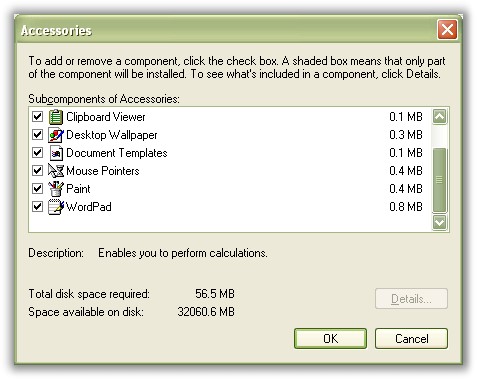
You can do this for many other components. This can really help when you want to trim down a system, but at the same time have the opportunity to bring something back if you need it.
One more thing…Subscribe to my newsletter and get 11 free network administrator tools, plus a 30 page user guide so you can get the most out of them. Click Here to get your free tools
{ 3 comments… read them below or add one }
Is there a way to show hidden programs ( not windows programs) ( other programs like games etc) in the add/remove control panel window so I may remove them. I have 300 mb of junk there as I can see it in windows program files and in the start menu. but I can’t see them in the add/remove programs window.
The puter is a compac with xp, and when I bought it these programs did show there, but I was lazy and did not remove them. These programs are ones that allow you to play a game for a certain time and then need to buy it. The title of the folder is called WildTangent and it contains both My HP games and My Compac games.
I read the above but it speaks of windows apps . Being that add/remove has 2 types of displays one for windows components and one for what may be called (other)
thanks
I simply use “Belarc Advisor” to see a list of ALL applications that have ever been installed (and still exist) on the system!
I am so glad I ran across this article! But I have a feeling that I’ll still have some things I can’t see? My other problem is there are items on the Add/Remove Program list that I can’t get off of there even though I no longer have the program.