
I helped do some IT work at an Insurance company over the weekend. A friend of mine is an IT manager there. I will take any chance I can to poke around a real life corporate network (Instead of playing around with a farm of Virtual Machines)…so it was worth the extra work.
One of the problems they had was a dead printer. We needed to move a group of users to an alternate one and needed an easy way to set the default printer without knowing all the passwords to everyone’s account.
After a quick search I came up with this VB Script:
Set WSHNetwork = CreateObject(“WScript.Network”)
WSHNetwork.SetDefaultPrinter “[PRINTER_NAME]”
We updated the script so [PRINTER_NAME] was the name of the printer we wanted as our default. To find the correct name, simply open the Printers and Faxes icon in the control panel.
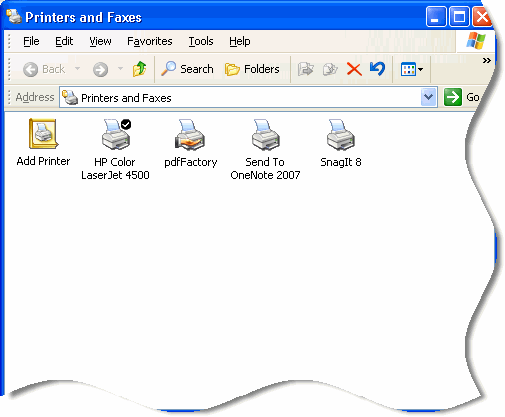
Use the exact words you see under the printer. So for example, if I wanted to set the Laserjet 4500 as my default, the script would look like this:
Set WSHNetwork = CreateObject(“WScript.Network”)
WSHNetwork.SetDefaultPrinter “HP Color LaserJet 4500”
Then I saved the script to a network shared and named it update.vbs (Share name was \\serverdc\printer)
In the users logon script I added this line:
cscript.exe \\serverdc\printer\update.vbs
Now when the users login they will have the new printer as their default.
One more thing…Subscribe to my newsletter and get 11 free network administrator tools, plus a 30 page user guide so you can get the most out of them. Click Here to get your free tools
{ 17 comments… read them below or add one }
Help!
Microsoft (R) Windows Script Host Version 5.8
Copyright (C) Microsoft Corporation. All rights reserved.
c:\defprinter.vbs(1, 31) Microsoft VBScript compilation error: Invalid character
Windows 7 Professional x64.
Set WSHNetwork = CreateObject(“WScript.Network”)
WSHNetwork.SetDefaultPrinter “IT-PRINTER”
This is from the blogging software we use here. You will need to erase the quotes and re-write them yourself…the quotes in the blog are a special kind that are not recognized by the script engine.
Microsoft (R) Windows Script Host Version 5.7
Copyright (C) Microsoft Corporation. All rights reserved.
c:\dp2.vbs(2, 1) Microsoft VBScript runtime error: Object required: ‘WSHNetork’
Help!
Thank You
You have a typo WSHNetork should be WSHNetwork
There’s some other items to consider for that network printer. This should be the full blown script if you were to have users in a multi-server environment. I don’t see success in using that script for a multi-server environment.
Batch Script
~~~~~~~~ ~~~~~~~~~ ~~~~~~~~~ ~~~~~~~~~~ ~~~~~~~~ ~~~~~~~
@ECHO OFF
::Replace CompanyName With your company’s real name
TITLE COMPANYNAME LOGON SCRIPT
:: echo off will hide the actions of the logon scripts
:: and allow you to leave a message of your own.
ECHO. ADDING PRINTER
Cscript \\serverdc\sysvol\domain.com\scripts\AddPrinter.vbs
ECHO. PERFORMING OTHER ACTIONS
::Add additional commands here.
~~~~~~~~ ~~~~~~~~~ ~~~~~~~~~ ~~~~~~~~~~ ~~~~~~~~ ~~~~~~~
You can remove all of the lines that use ::, they are just notes for anyone using the script.
AddPrinter.vbs
~~~~~~~~ ~~~~~~~~~ ~~~~~~~~~ ~~~~~~~~~~ ~~~~~~~~ ~~~~~~~
Set WSHNetwork = CreateObject(“WScript.Network”)
WSHNetwork.AddWindowsPrinterConnection “\\serverdc\HP Color LaserJet 4500”
WSHNetwork.SetDefaultPrinter “\\serverdc\HP Color LaserJet 4500”
~~~~~~~~ ~~~~~~~~~ ~~~~~~~~~ ~~~~~~~~~~ ~~~~~~~~ ~~~~~~~
Store them in this location:
~~~~~~~~ ~~~~~~~~~ ~~~~~~~~~ ~~~~~~~~~~ ~~~~~~~~ ~~~~~~~
\\ServerDC\netlogon
~~~~~~~~ ~~~~~~~~~ ~~~~~~~~~ ~~~~~~~~~~ ~~~~~~~~ ~~~~~~~
The local drive location on the domain controller is C:\Windows \ Sysvol \ Sysvol \ Domain.com \ Scripts
Group Policy Deployment
~~~~~~~~ ~~~~~~~~~ ~~~~~~~~~ ~~~~~~~~~~ ~~~~~~~~ ~~~~~~~
User Configuration \ Windows Settings \ Scripts (Logon/Logoff) \ Logon
~~~~~~~~ ~~~~~~~~~ ~~~~~~~~~ ~~~~~~~~~~ ~~~~~~~~ ~~~~~~~
Open Logon properties, add \\serverdc\netlogon
Obviously replace serverdc with your own real Domain Controller in your business throughout all of the steps here.
I’m sorry, objNetwork should be WSHNetwork, I don’t normally use WSH network but I was trying to make it as close to your script as possible.
Thanks for the post. Really appreciated. I have updated your code so it has WSHNetwork for the objects.
Can you advise on the syntax for Windows 7 due to the UAC restrictions my Pre-Win 7 script doesnt work. any thought on getting this to run as admin with out hard coding the admin user s password??
reference my previous comments..
After some additional research I have noted that you can not disable the UAC on the fly
I will have to look at getting the script run as ADMIN some how.
if anyone has any additional thoughts… please post.
PS: my script takes a 3 digit entry and uses that to create the 2 and 3 octect of an IP to generate the ip addy of the printer.
The driver make and model is pre defined in the script so it looks in the printer repository fromt eh printer driver. if it cant find it it downloads the driver from the F&P server and begins the install… names the printer and logs the event inc. time dates and signed on user.
I reduced the logon script to just this line:
Cscript \\pdcserver\sysvol\ourdomain.local\scripts\AddPrinter.vbs
When I run the script (Win 2008 R2), I get a Syntax error 800A03EA, first line, 9th character.
Any ideas?
Do I have to include the “.local”?
i am using this script, but it is unable to set it to default. The printer name is as follows :K2Printer2Backup on http://abc.def.abdc.edu:631
code as follows:
Set WSHNetwork = CreateObject(“Wscript.Network”)
WSHNetwork.SetDefaultPrinter “\\K2Printer2Backup on http://abc.def.abdc.edu:631
“
Get the printer name from here…
HKEY_CURRENT_USER\Software\Microsoft\Windows NT\Current Version\Devices
Set WSHNetwork = CreateObject(“WScript.Network”)
WSHNetwork.SetDefaultPrinter “[Printer Name]”
also after copying the code make sure you replace quotes with quotes in notepad…
Note: The code here has unicode quotes… when you copy the code from here it copies bad characters.
Zunair = STAR MAN!!!
Thanks!
Hi Admin,
i want a script to check the default printer on multiple servers and save the log in text file.
Can you make it for me…Please
Hi Sainaveen,
This would be your vbs script:
strComputer = "."
Set objWMIService = GetObject _
("winmgmts:\\" & strComputer & "\root\cimv2")
Set colPrinters = objWMIService.ExecQuery _
("Select * From Win32_Printer Where Default = TRUE")
For Each objPrinter in colPrinters
Wscript.Echo objPrinter.ShareName
Next
Then you could run it like this in a logon script:
cscript.exe \\server\share\def_printer.vbs >> \\server\share\printer_list.txt
Steve
Hi
i need a script what set the printer settings to “Print Monocrome”
and that on all Printers on a PC
can you help me ?
I use WIndows XP an d IWndows 7 PC´s
Thx