
I have an old friend that lives about a mile away from me. We went to elementary school together, and were best of friends until a little after high school…and we drifted as we got busy with our own lives.
Well… He still remembers me plunking away on my Commodore 64 back in the day, and figures I might know something about computers. He calls me right before my nightly walk and says he needs help getting his new computer on the Internet. Sure I say…I will walk to your house and we will get you setup in no time.
I was expecting to setup a broadband connection for him. When I arrived he had a modem in one hand, and a NetZero disk in the other. He had been working at it all night with no luck.
I sat down and started playing with it. Every time I tried to connect I would get a simple error message from NetZero saying it could not communicate with the modem.
I have my own PPP server at home with a private phone number, so I start trying to setup a connection to test with…and here is what I saw
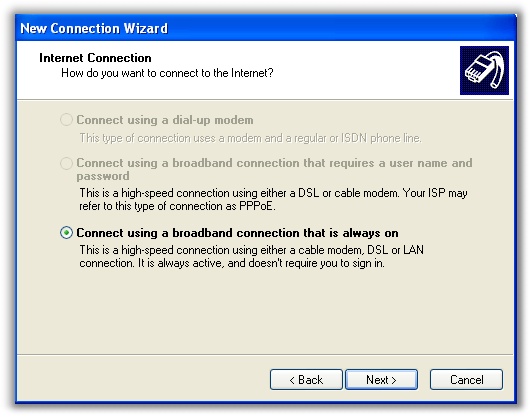
Grr. I can’t select the dial-up option and it won’t tell me why. Worse yet I had no Internet connection to do research to find answers (Unless I wanted to walk a mile back to the house).
I checked the modem, and it tested out fine. It was a good old US Robotics external and it could dial out when I used it from hyperterminal with no problems.
I checked his user account…he was a full administrator.
One by one I disabled startup programs using MSConfig, with the thought that something was getting in the way of dial up networking.
Then I moved on to services. Started disabling the Anti-Virus, etc….and then…only then did I come across this service:

Yea. You see the arrow. It was disabled. I enabled it, and started the service. Didn’t even bother with my test PPP connection. Launched NetZero, and it connected on the first try.
Once connected I tried to find out why someone might disable this service. It looks like the previous owner had “Optimized” his system by disabling services that he did not need. Which is perfectly fine as long as you don’t need dial up networking.
As I walked back to my house I pondered this thought – My friend had told me this was the first time he had ever been on the Internet.
One more thing…Subscribe to my newsletter and get 11 free network administrator tools, plus a 30 page user guide so you can get the most out of them. Click Here to get your free tools
{ 6 comments… read them below or add one }
Your are genius! Thanks, bro!
Thanks. This worked for me on WinXP SP3. I had referred to many support web sites that spoke about fixing registry and other things but none of them solved my problem. Your solution was the simplest and the best 🙂
GREAT!
But then why Windows Online Support Article have some useless solutions posted?
Your Solution worked great and its Precise.
Excellent Artical. Helped to solve the issue in seconds. 🙂
Excellant Solution!!
Perhaps you can help me, as not even Microsoft has! I cannot dial in a connection on windows 10. Keep getting error message 720. I bought a new dialup modem, Zoom 3095, per my provider Copper.net. It did not work. Took it back, per Zoom tech support,got another 3095, same issue. In no way am I a computer wizard. bit I can install an internal or external modem–(LOL). But, where do I find the remote access connection mgr.? I really need your help to get connected to the internet. ONLY dialup is available in my area!
Thanks, MR. WATKINS