
After I wrote about the Office compatibility pack, a reader asked this question:
I just saw your post on the compatibility pack. This seems like an ideal thing we can use here, but I can’t seem to locate the msi file so I can push it through the domain
After doing some experimentation and using the sysinternals tool filemon…I discovered that it extracts the contents of the compatibility pack into this folder:
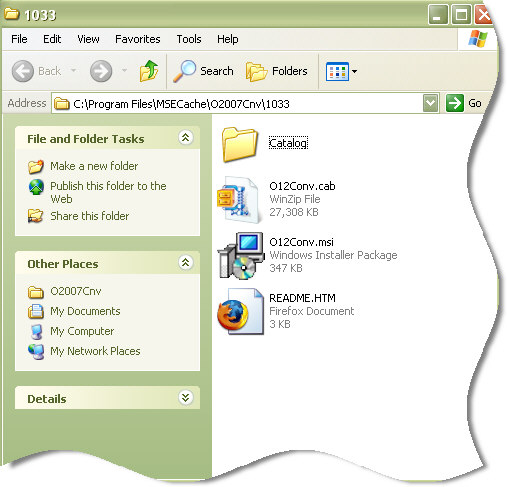
Then you can simply copy the entire contents of this folder, and put it on a public share.
Then deploy O12Conv.msi to your computers using GPO…and if you don’t know how to do that, then check out my last article about it.
One more thing…Subscribe to my newsletter and get 11 free network administrator tools, plus a 30 page user guide so you can get the most out of them. Click Here to get your free tools
{ 2 comments… read them below or add one }
Isn’t this just like Microsoft — they can’t seem to pull it together. Hmmm….perhaps they need some serious inter-department COMMUNICATIONS training!
GPO software installation is fantastic. But way too much Microsoft stuff is not readily compatible to push with GPO. We have to go figure out stupid tricks like this to make it work.
Suppose I shouldn’t complaint too much though. Job security and all 😉
The file that you can download from microsoft is fileformatconverters.exe. If you go to a command prompt and type fileformatconverters.exe /? it pops up a list of commands you can do for deploying the software. One option is /extract:Path which will extract the .msi file and the rest of the contents of the package to the path you specify. If you are using something like altiris or sms you can directly deploy the package using the executable and the options /quiet /passive /norestart and there will be no disruption to the user. fileformatconverters.exe /quiet /passive /norestart