
I received an email earlier this week from a reader (Brian):
The Hide/Show Menu main menu doesn’t seem to work with this utility. I can easily hide it via other means, but your utility doesn’t seem to do it. All other changes apply, but not that one.
He did quite a bit of research for us, and determined how our utility was writing to the registry. Thanks to Brian’s diagnostic help we have determined that IE 7 no longer looks to the HKEY_LOCAL_MACHINE key for the changes described in my previous article on the subject.
Normally with preferences like this, a Microsoft application will search HKEY_CURRENT_USER, then check HKEY_LOCAL_MACHINE. So if you want to make the setting system wide, you simply write to HKEY_LOCAL_MACHINE. If you want it for just the current user then you write to HKEY_CURRENT_USER.
The more I think about it, we should have been writing the updates to HKEY_CURRENT_USER anyhow. This allows you to customize the setting for each individual user on the system without impacting others.
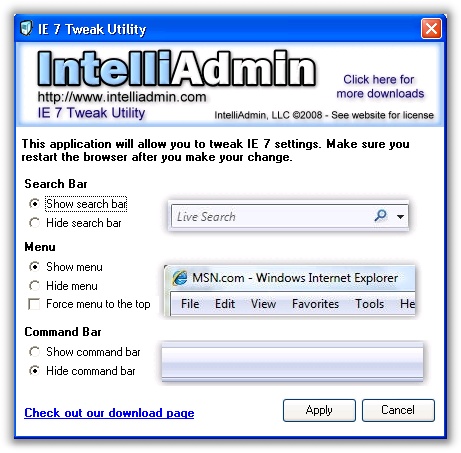
We have updated it to write to HKEY_CURRENT_USER. To get it you can download it from here.
As always – no spyware, adware included – only freeware goodness.
One more thing…Subscribe to my newsletter and get 11 free network administrator tools, plus a 30 page user guide so you can get the most out of them. Click Here to get your free tools
{ 2 comments… read them below or add one }
I have a question in regard to getting a full list of IE settings and configuration. I occasionally want to compare IE settings on two different computers. Is there a way I can output an organized list of all IE settings e.g. advanced options, BHO, Add-On, security, registry, etc. so that I can place the lists produced on two different computers and compare item by item?
Your assistance for this is appreciated in advance,
Arlester Christian
I have the exact same issue as Arlester Christian above. Would like to know if anyone has a solution for this?