
We are now opening the beta to the general public. If you don’t know already, our Remote Control 3.0 is in beta, and has a few interesting features:
-256 bit AES encryption
-Request Access before connecting
-Support for Vista, 2008 and 64 bit windows
-Support for third party VNC clients like RealVNC, UltraVNC, and TightVNC.
To Get the download, simply use this form to get into the beta site:
http://www.intelliadmin.com/beta/signup.asp
The VNC support is a “clean-room” implementation of the RFB protocol. This means we took the public information about VNC provided by this document.
We carefully designed it with security, performance, and modern operating system support in mind. Since we built ours from scratch our remote control will be unlike many other VNC compatible servers – it won’t have the same quirks and bugs as RealVNC – We will just have our own quirks and bugs! 🙂
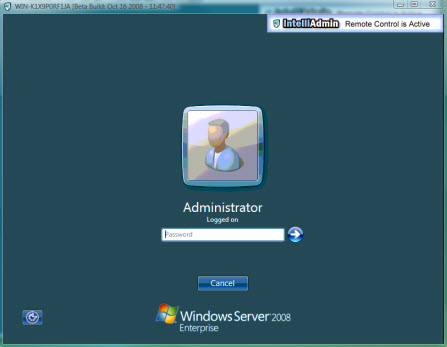
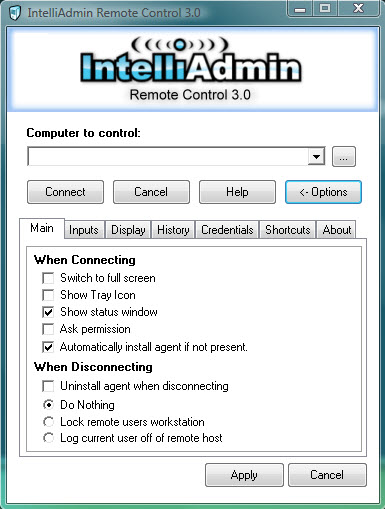
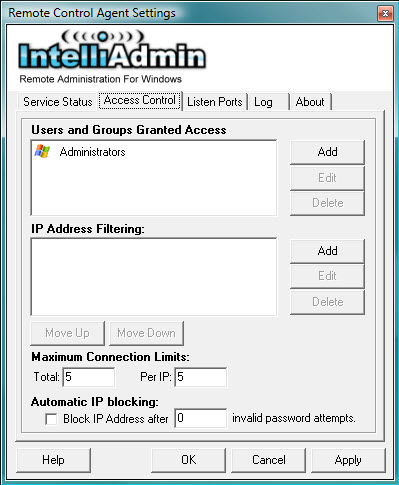
Here are a few screenshots:
A remote control session to a 2008 64 bit server:
The client settings and connect window:
The agent settings window:
One more thing…Subscribe to my newsletter and get 11 free network administrator tools, plus a 30 page user guide so you can get the most out of them. Click Here to get your free tools