
I was installing the Windows 2003 Resource Kit today, and I ran across these two command line programs that come with it:
cdburn.exe
dvdburn.exe
I started poking around, and I realized they both could be used to burn ISO files from the command line.
For a test, I downloaded a random ISO from MSDN, and gave it a spin:
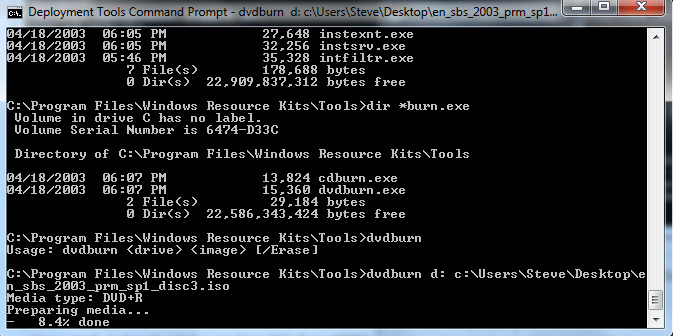
Sure enough, it burned the ISO to dvd without issue – and actually it seemed faster than most of the GUI programs I have used in the past.
So what do you need to get this to work for yourself?
1. Download and install the Windows 2003 Resource Kit
2. Once you install, go to the command line and get into this folder:
C:\Program Files\Windows Resource Kits\Tools
3. Then, burn your DVD by using DVDBurn.exe, or burn your CD by using CDBurn.exe. Here are the command line options:
DVDBurn.exe {DVD_DRIVE_LETTER} {ISO_FILE_NAME}
CDBurn.exe {CD_DRIVE_LETTER} {ISO_FILE_NAME}
That is all there is to it. Now..what would make this complete is a way to build an ISO from the command line. Anyone know of a free way to do this?
One more thing…Subscribe to my newsletter and get 11 free network administrator tools, plus a 30 page user guide so you can get the most out of them. Click Here to get your free tools
{ 5 comments… read them below or add one }
Hallo,
actually these are great tools 🙂 for this kind of platform – thanks for the article.
According to Your question
“Anyone know of a free way to do this?” –
I’m glad that i can answer that positively. The soft is on OSS license (more liberal than GPL).
Since about 10 years, to create images consistent ISO9660/Joliet/RockRidge/UDF/HFS standards I’m using a free cmdline tool called mkisofs – a brother of the cdrecord from the cdrtools package – there are even some third party binaries available for Win/x86 Platform – give it a try 🙂 !
Mkisofs have many, many parameters/switches available that can help You create exactly the image You want.
You can add any boot image to the ISO (for any weird architecture You could possibly find) eg.: -sparc-boot, -sunx86-boot, -alpha-boot, -hppa-{…}, -mips-boot, -mipsel-boot.
Switches explained: http://linux.about.com/library/cmd/blcmdl8_mkisofs.htm
Before K3B had been released i used to run mkisofs with a parameter that gives the number of sectors that will be used on a media by the ISO image ‘-print-size’ – this helps You burn the directories in half of the time via a pipeline “stdout of mkisofs | stdin of cdrecord”.
Yes the POSIX pipes are also available in cmd.exe on MS_Win 🙂 but i wouldn’t count on them ;>
I hope I could help You.
Best regards and thanks again for the {CD/DVD}burn info!
— Tim Ł.
There’s a Microsoft utility called CDIMAGE.EXE (107 KB), it’s a “Microsft internal use only”, you can Google it and get it, it seems to be free.
I’m not sure if it can be found on a Resource Kit somewhere.
Thanks Ivan, and Tymek, I will check them both out.
I know this is years late, BUT, you can use oscdimg.exe to create the iso image, it’s free from microsoft..
Thanks for the tip time traveler.