
Once and a while we visit local customers. It is a great way to see our software working in the real world, and find out what we can do to make our products better. Many times I will be asked to solve an issue (That has nothing to do with our software)
This week while visiting a customer I was asked if there was a simple way to create a batch file (No VB Script) that would reset the default home page of IE 6. For various reasons they could not use Active Directory, nor could they use VB Script.
I started to play around with the command line options of regedit, and discovered it was not going to work. After some research I came across the reg.exe command. It seems like it is built into XP, 2003, and Vista. It is perfect for what I needed.
It allows you to modify/delete keys from the command line. Here is what I came up with:
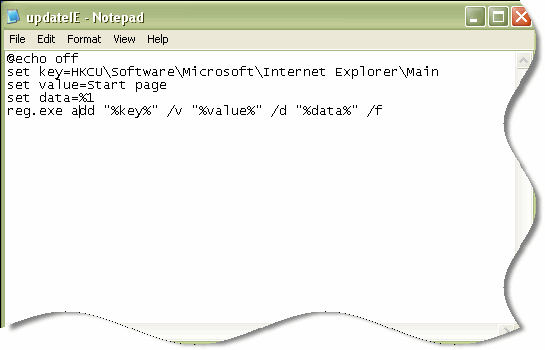
I saved it as UpdateIE.bat. Now I can simply call it like this:
UpdateIE “http://www.intelliadmin.com”
It updates the local users IE home page, and very easy to add to a login script
(Below is the script source so you can copy and paste it)
@echo off
set key=HKCU\Software\Microsoft\Internet Explorer\Main
set value=Start page
set data=%1
reg.exe add “%key%” /v “%value%” /d “%data%” /f
One more thing…Subscribe to my newsletter and get 11 free network administrator tools, plus a 30 page user guide so you can get the most out of them. Click Here to get your free tools
{ 9 comments… read them below or add one }
What adjustments to this script (which works great for IE8 on Win7) are required to run under Citrix?
Thanks for the assist.
But your example is a little off and it took me a little while to debug. First, path you showed has spaces (‘Internet Explorer’) So the path should be enclosed in double quotes. Also, the parameters are not delimited correctly. Need to remove the quotes from there. Here is what I got to work:
@echo off
set key=”HKCU\Software\Microsoft\Internet Explorer\Main”
set value=”Start page”
set data=%1
reg.exe add %key% /v %value% /d %data% /f
So how would I create a shortcut that would change my home and then start explorer?
And here is how it should actually look:
@echo off

set key="HKCU\Software\Microsoft\Internet Explorer\Main"

set value="Start Page"

set data="%1"

reg.exe add %key% /v %value% /d %data% /f
Note the “” around the %1
Hello Tim,
Thanks for taking the time to post this.
Hi Steve I know this is an old article (and honestly I wonder if you will even get to read this post but at least it can help someone else looking for this [this page is the first result in Google after all])
Why not just run a one line reg bat? For example:
@echo off
reg add “HKEY_CURRENT_USER\Software\Microsoft\Internet Explorer\Main” /v “Start Page” /t “reg_sz” /d “http://www.intelliadmin.com” /f
Hi David,
That actually is a better option. At that time I might have forgotten about “reg add”
Thanks for the post,
Steve
Very helpful script. I didn’t realize there was a reg.exe command, I’ll be using that more to automate things.
However, copy/paste did not work and it took a bit of playing around (I finally realized I could just put the ‘pause’ command in at the end of the script to stop Windows 7 from closing the window and clearing out my returns.) The problem is this: the website formatting changes the dumb quotation mark (ASCII 0x22) to smart ones (ASCII 0x93 and 0x94). The CMD line does not deal with the smart quotes and the command produces an Invalid Key Name error.
@Tim
Good work presenting as plain text. This fixes the problem. And that is actually why code should always be pasted as plain.
@Chris
You are mistaken, the quotes can be in either place. The problem lies in what character was used for the quotes; when you deleted them and retyped them in a different location you unknowingly corrected the problem.
Just wanted to note yes the quotes are the issue just retype them to fix.
Heres mine – likely website is changing it with FONT type.
echo Y | start /wait Reg.exe add “HKCU\Software\Microsoft\Internet Explorer\Main” /v “Start Page” /t “reg_sz” /d “http://www.markcollins.ca” /f