
Previous Posts


Remove an email from all mailboxes in Microsoft Ex...

Error in registry for extension "Exchange Extensio...

Map ISO files to a drive

Microsoft Updates IE 7

Adobe Reader flaw confirmed

Deploy Office 2007 compatibility pack via GPO

Deploy applications via group policy

Get the Office 2007 Compatibilty pack

Limit Automatic login for Windows XP, 2003, and Vi...

Fake windows patches via google


Archives

May 2005

January 2006

April 2006

May 2006

June 2006

July 2006

September 2006

October 2006

November 2006

December 2006

January 2007

February 2007

March 2007

April 2007

May 2007

June 2007

July 2007

August 2007

September 2007

October 2007

November 2007

December 2007

January 2008

February 2008

March 2008

April 2008

May 2008

June 2008

July 2008

August 2008

September 2008

October 2008

November 2008


Subscribe to our Feed:


Utiltity that shows you all startup programs

If you like this article, then sign up for our email newsletter to get more like it every day in your inbox

I just finished helping a friend remove some pretty bad spyware from his system. In addition to the usual removal tools - AdAware, and Spybot I found the Autoruns utility from Sysinternals to be very useful.
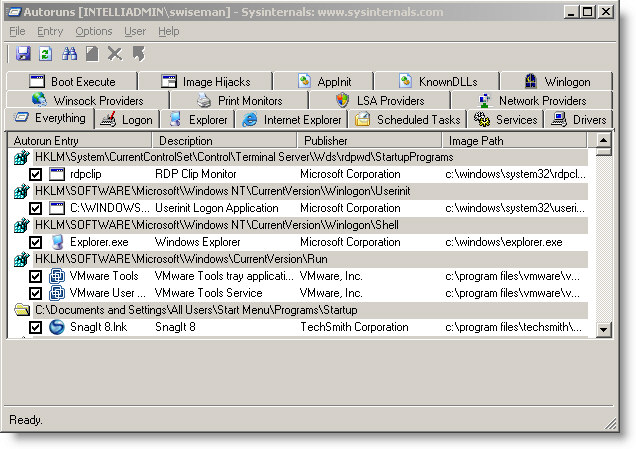
Auto Runs Utility

It is a comprehensive piece of software that will allow you to see every possible startup program in one place. It beats searching through the registry by hand.

Best of all it is totally free, and can be downloaded from Microsoft here:

http://download.sysinternals.com/Files/Autoruns.zip

More info about the utility can be found here:

http://www.microsoft.com/technet/sysinternals/ProcessesAndThreads/Autoruns.mspx


Posted By: Steve Wiseman on Tuesday, October 16, 2007

Check out our utilities for windows


Copyright © IntelliAdmin, LLC, 2008. All Rights Reserved