
Sometimes Windows gets so cloged up you just have to call it quits and reformat the entire hard drive. Starting from scratch is nice since you know all of the baddy spyware, trojans, and rootkits are not going to lurk in the background and come back to haunt you a few days later.
The biggest problem I have when I do this is I can never find the OEM sticker on the machine. If you have never seen one, these OEM stickers are required by Microsoft to be put on a machine when windows is installed at the factory – that way you will always have a serial number when you reload the machine. More often than not, the user tears it off or it is a white box special.
There is a great utility with a cool name – The Magic Jelly Bean Key Finder
It works on XP, and 2003. It will quickly find and display the current serial number for the system it is run on.
Just launch the application and it will instantly show you your serial number:
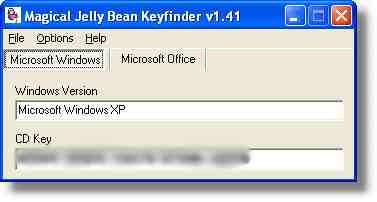
Now, my serial is blured out for obvious reasons.
Just another one of those apps to add to your toolbox
Download it from http://www.magicaljellybean.com/
One more thing…Subscribe to my newsletter and get 11 free network administrator tools, plus a 30 page user guide so you can get the most out of them. Click Here to get your free tools
{ 4 comments… read them below or add one }
new…look
Sometimes Windows gets so cloged up you just have to call it quits and reformat the entire hard drive. Starting from scratch is nice since you know all of the baddy spyware, trojans, and rootkits are not going to lurk in the background and come back to haunt you a few days later.
Quite a useless app considering that you can just go to MyComputer, View System Information, to see it, no magic required. This begs the question: What is the true purpose of this application? Does it nestle some “magic jelly beans” in your system???
Hello Timmi,
I don’t think you are seeing the serial number there. That is the product ID…totally different. There are many times you want to get the serial number out of a known system. Namely, you want to format and reload…but don’t know what the serial is