
I have been asked this a few times now. How can you force Microsoft Internet Explorer to default to a custom home page?
It really is a simple group policy setting, but with many group policy options – it is not always easy to find.
First, for this to work I am assuming you have a Windows 2003/2000 network with Active Directory, and your client workstations are joined to the domain
Get on the domain controller, go to Administrative Tools, and Launch Active Directory Users and Computers.
Right click on the domain where you would like to create the policy.
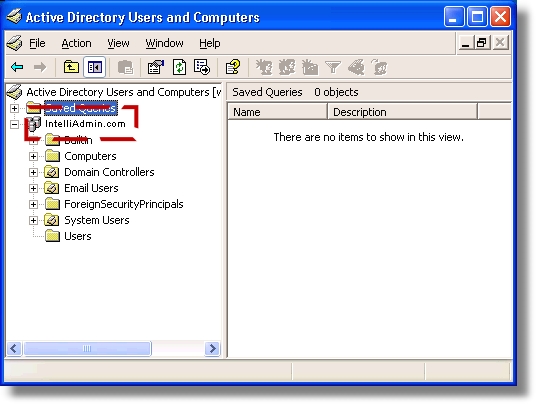
A menu will popup – select properties. A dialog box will be displayed.
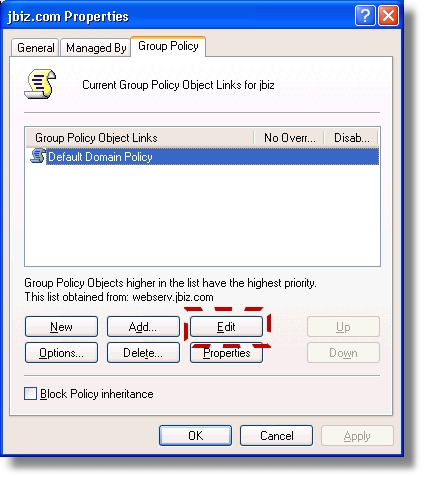
Click on the Tab that says “Group Policy”
Now Click on the Edit Button
A tree view of policies will be displayed.
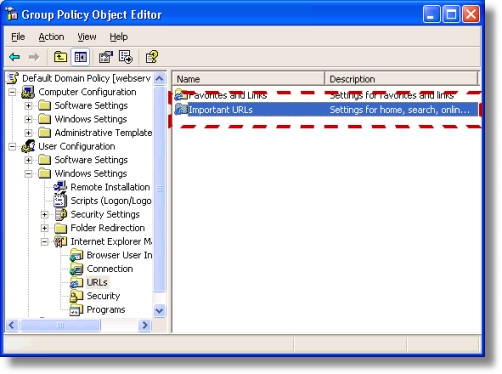
Drill down to this key:
User Configuration -> Windows Settings -> Internet Explorer Maintenance -> URLS
Now, double click on Important URLS. You should see a dialog box that lets you change the default Help, Home, and Search pages of IE.
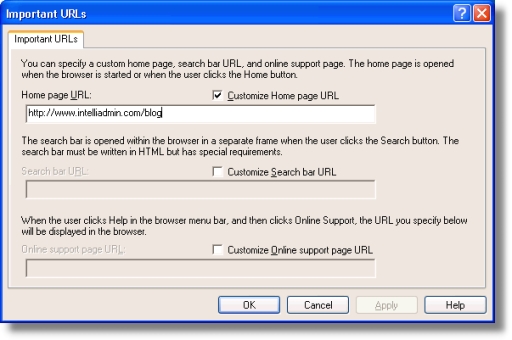
Make your change, and wait. I will take some time before the change replicates across the network – workstations will also need to be rebooted for the change to take effect.
One more thing…Subscribe to my newsletter and get 11 free network administrator tools, plus a 30 page user guide so you can get the most out of them. Click Here to get your free tools
{ 10 comments… read them below or add one }
thank for the inf. 🙂
I would advise not changing the default domain policy and recreatng a new policy for this. Best Practices and all that.
Nicely presented.
Note. A machine does not need to rebooted, as this is a user based poilicy. The users will need to log off and on again, and the policy will be in place.
Alternatively, to test the setting.
Start > Run > gpupdate /force
this will force the group policy settings to be downloaded from the domain.
It was Very useful!!! thanks a lot
Thanks. It’ been a few years and I forgot how to get to this setting.
Thanks for this. I couldn’t recall where the group policy was for this setting and computers all across my network had the wrong intranet by default! >_<
How can I set it up so that it will look to a HTML file that I have created? I have tried but it says that my URL is incorrect.
Hi Aaron,
I am not sure if you can provide a link to a file…IE may prevent this for security reasons…still you might want to try putting the path in the file URL format. Like this:
file:///C:/temp/file.htm
How to customize (changing default web page) in windows server 2008
Hi,
It does not really matter which Windows version you are using…but the viersion of IE. It should be really close to the instructions in this article. I don’t think this part of IE has changed much over the different versions.