
Setting up a logon script in active directory is not always that simple. Lets walk through it.
First, open “Active Directory Users and Computers” on the domain controller
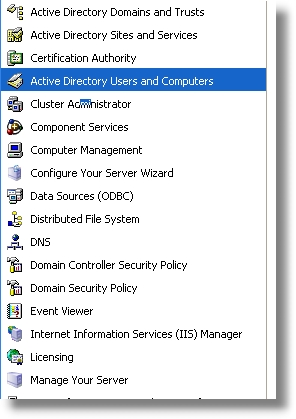
Now right click on the user you want to have the logon script and select the properties menu.
A properties dialog like the one shown below will appear. Select the ‘Profile’ Tab
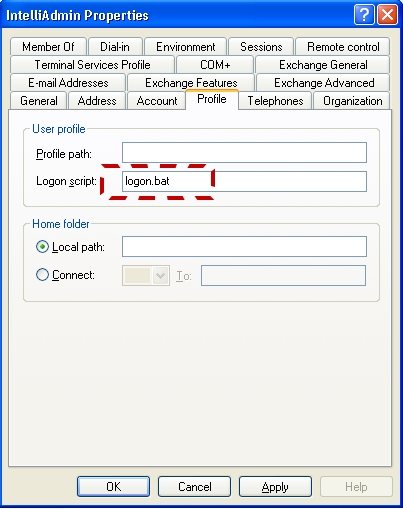
Here is the confusing part. If I just put any old batch file name in the logon script field, where does windows try to find it from?
Lets find out. First, type in this field ‘logon.bat’
Click OK.
Now, we need to find the folder where the server loads logon scripts. It follows this format:
\\(SERVERNAME)\sysvol\(DOMAIN NAME)\scripts
So, if my server was named DCServer1, and my domain was intelliadmin.com, we would browse to this path:
\\DCServer1\sysvol\intelliadmin.com\scripts
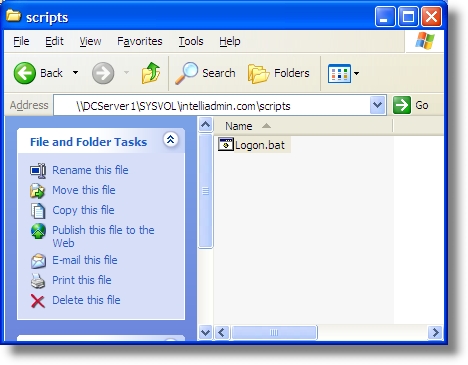
Now that we know where to put it, creating the script is easy. Just open up notepad, and write your batch file. For our test batch file we will put in a line that loads our profile generator for Microsoft Outlook XP

We are done with the script, so we save the text file as:
\\DCServer1\sysvol\intelliadmin.com\scripts\logon.bat
Now, the next time this user logs in, they will load the login script.
One more thing…Subscribe to my newsletter and get 11 free network administrator tools, plus a 30 page user guide so you can get the most out of them. Click Here to get your free tools
{ 10 comments… read them below or add one }
How to write auto script log on in windows 2003 server
If you have any idea please help me
What do you need help with?
Thanks for explaining
just wondering how to display a notice when a user log on to network, and how to map network drive through script
I believe I followed the post instructions exactly. My client machines have limited security/user rights/priveleges.
What security/user rights/priveleges must clients have to be able to use the logon script set in active directory?
My script is a .bat file, containing one line that maps a network drive:
“NET USE X: //server/share \USER:username passw”
but when I log on to client the drive isn’t mapped.
I don’t think there are any limits to who can have a login script. Make sure you are setting it up as a user group policy, and not a computer one…since those in the computer context are run as ‘system’ and ‘system’ cannot map network drives
“NET USE X: //server/share \USER:username passw”
vs.
“NET USE X: \\server\share /USER:username passw”
please try the last one
cheers,
lany
I appreciate you for this script
Hi, Thanks for the tips Steve.
I was wondering is someone can help me with creating a logon scrip that does:
1. Screen saver should be password protected after 5 minutes on inactivity.
2. Disconnect the wireless, if it is connected (since it will be connected via Ethernet)
3. Add shortcuts for Word, Excel, Outlook, IE, Adobe, My computer
4. Word – setup the defaults for documents and auto recovery to point to the \\P drive
5. Excel – setup the default for documents to point to the \\P drive
6. Set homepage to http://www.company.org
7. Outlook – when setting up, please be sure the box is deselected for Using Cache
8. Outlook – set to not auto archive
9. Disable Offline files
10. Add Endpoint
11. Add Signature pad software
Thanks.
Can i get users from specific OU by scripting?
Hello All,
I have already mapped the share drive. But there is a problem . Today the end user updating some file in map drive that is not showing the updated file on next day.i unable to shut it out the problem can some body help me sir.
I am crest the domain in 2012 server and the share folder also.
Please help me