
We just polished off a new version of IntelliAdmin Lan Edition. If you have never tried it before it’s a program that lets you remote control computers across your network.
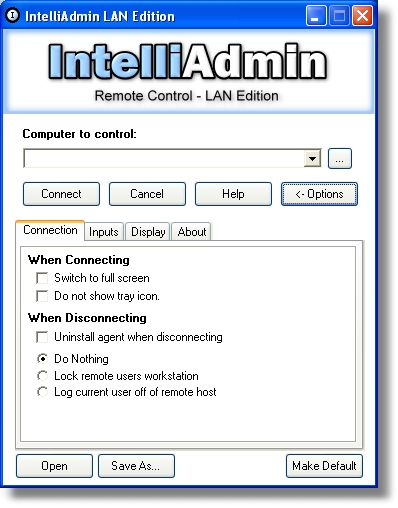
The big feature of this product is that it can control machines on your LAN – without installing a thing. Usually when you want to set something like this up, you need to walk around to each machine and install an agent.
Instead, you type in the computer name, and IntelliAdmin automatically installs the software it needs over the LAN (Provided that you have administrative credentials for the remote machine).
You all have been great at requesting features and sending us bug reports. We have tried our best to implement the most popular requests.
Here are a couple of them
Launch via URL:
If you already know the name of the computer you want to connect, you can just type this in the run window (Click Start, then Run)
iadmin://computer1
Click OK and IntelliAdmin is immediately attempting to connect to computer1
Connection shortcuts:
This allows you to easily use different settings for different machines. For example, if you have that really slow machine in accounting and you want to reduce the colors. You could tweak it out for best performance, and save the shortcut to the desktop.
Double click on it, and you are connecting to that machine in seconds – with all of your preferred settings.
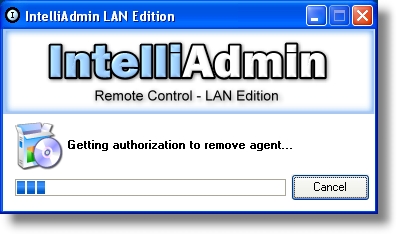
Agent UnInstall progress:
IntelliAdmin allows you to get into a machine, and remove all traces when disconnecting. In previous versions we did not display any progress indication of the agent removal. This did cause problems, since many times users would close the application before it was finished. Now, when you select the option to remove the agent when disconnecting, you are shown the progress of the removal:
For a more detailed look at its features please check out the users manual.
Two major bugs were fixed in this version:
Dual Monitor Bug – Second monitor was shown, but mouse movements not sent to it.
Authentication Bug – Reported error when should have shown password box
We have tried our best to design this product specifically for use on your local network. If you are looking for a remote control solution that works over the internet, you may want to check out Remote Control Internet Edition
One final note – All registered users can upgrade to 2.7 for free. Just use the same download link when you purchased. If you lost it, send me an email at steve.wiseman@intelliadmin.com
One more thing…Subscribe to my newsletter and get 11 free network administrator tools, plus a 30 page user guide so you can get the most out of them. Click Here to get your free tools