
This has to be one of the most annoying “features” of windows:
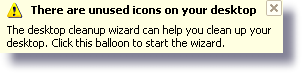
I don’t think there has ever been a time when it has been useful to me. It is one of those things you put up with, but never find how to disable it.
I got tired of it today, and I will share the answer with you. The setting for this is actually in the display properties.
First get into the control panel (Start->Settings-Control Panel)
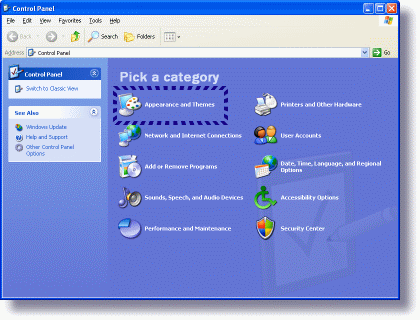
Click on Appearance and Themes
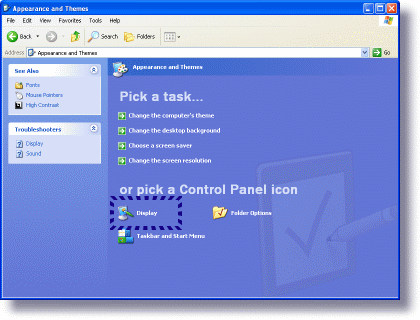
Click on Display
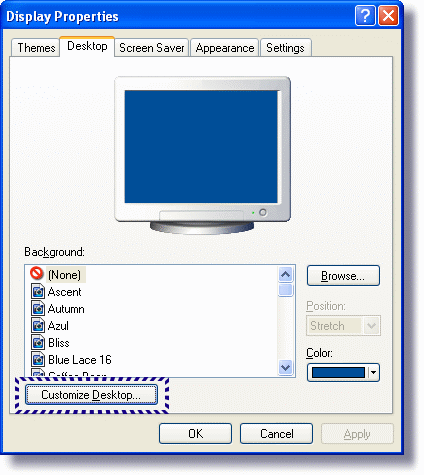
Click on the Desktop Tab, and see the button below “Customize Desktop” Click on it
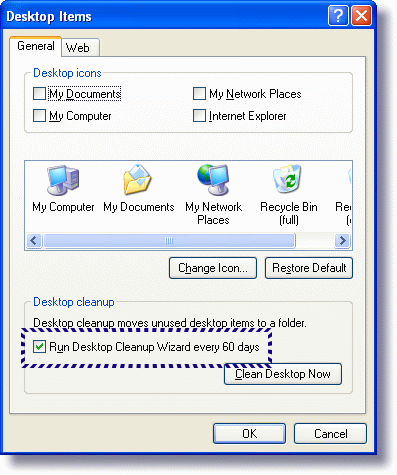
Now you can un-check the desktop cleanup wizard…and never be bothered by this insanity again!
One more thing…Subscribe to my newsletter and get 11 free network administrator tools, plus a 30 page user guide so you can get the most out of them. Click Here to get your free tools
{ 30 comments… read them below or add one }
Tips like this are what make the internet worthwhile!
Thank you
Thank you for the tip.. Will apply it to all my computers..
Just what I was looking for – thanks.
There’s a slightly quicker way of getting to the control. Right-click the desktop background and choose “Properties” from the menu that appears. Then click on the “Desktop” tab and you’ll be on the penultimate image above.
I agree with Chris. If you have changed from the default (all of Windows settings seem to be by default annoying) annoying new graphic menu the steps mentioned do not work but Chris’s work either way.
Very true. The way Chris describes is the best.
Thank you! Simple and useful!
Thanks a lot. This thing is almost as bad as Clippy.
Thank you God!!! That was driving me crazy! (that popping sound when it shows up)
Windows – The Annoying ‘Friend’ that never really has much to say that’s useful….
Thanks!
I found this really useful, as I have desktop icons turned off and always found this pop-up really annoying!
Thanks so much! My heart is lighter. Life is stressful enough with out windows awfull “reminders”. If only Windows programmers and directors could grasp the concept of simple and reliable.
thanks…is there anyone on the planet who hasn’t put up with this Windows nag umpteen times, or who has actually WANTED to run that stupid ‘desktop clean up’ wizard? Why on Earth would ANYONE think that users can’t decide for themselves when they want to remove icons from their desktop? Finally got tired of telling it to go away today
THANK YOU!! This will be one less aggravation in my pc life!
Thank You!! This “feature” would not be so annoying if, when the balloon appeared, clicking on the “x” would make it go away until the next 60-day cycle. But NO — M$ knows better than I what I want. I _want_ to be pestered by this nuisance every 6 minutes. NOT!
Thank you!
As already stated, probably the most irritating feature of XP. Whoever thought that this could be a good idea? Anyway, many thanks for the brilliant tip, and I’ll disable this rubbish on all my computers.
Sweet. You’re a lifesaver. Finally got fed up with MS’s brilliant idea to create a popup where the X doesn’t behave like every other X in windows. If I clicked X, I don’t wanna see it anymore. Go away! Having to open and click cancel annoys the crap out of me.
Thanks. Indeed, I was looking for the same thing.
Thank you!
Like everyone before me stated, thanks for this great tip to removing an aggravating nuisance.
/
I finally got fed-up today, too. It’s fascinating that simply by typing the phrase “There are unused icons on your desktop” into Google, up comes THIS page, as a first choice: a clear indication that this “feature” annoys everybody!
thank you thank you, a hundred times thank you
Thanks – this has plagued me for yonks, thank the lords of the internet for people like you!
Peter
You are my hero…for at least the next 15 minutes.
Microsoft – please fire the imbecile who came up with the Desktop Cleanup Wizard.
Beta testers liked this? Really?
Years after you first posted this, and it’s still helping people! I had forgotten how to do this so your explanation was very helpful. As long as there’s an easy way to turn off a feature, I have no problem with it.
And, no nasty remarks about Clippy! Him and the little doggy on the search feature are the best things about Windows!
He he. To each her own Barbara…to each her own 🙂
Thanks for taking the time to post – Steve
Does this disable features also available in Windows Vista and 7? I get very annoyed with it too.
Hi Daniel,
I don’t think Windows 7 and Vista actually have this message…so I don’t think this will help with other annoying popups under these versions of Windows
Thanks. I think I disabled this annoying message once before, but I forgot how I did it.
Thank you! There are enough annoyances I can’t do anything about, so I’m extra-relieved to get rid of this one.