
We have updated our Network Administrator product – You can use it to deploy the patch, and verify it’s installation on machines across your network. Also we have updated the free patch More info about it here
Update 10/25/2009: We have updated our patch again. Both the patch, and Network Administrator have been updated with the latest
Update 2/12/2007 12:57 AM EST – We created a different patch for Windows 98/ME. Visit here for more information
Update 2/12/2007 12:56 AM EST – We want to also remind you that Outlook, Exchange and Java have their own issues. This patch will not fix that. Please see these links for more info on fixing those issues:
See this article for Exchange, and Outlook
http://www.microsoft.com/windows/timezone/dst2007.mspx
For Java:
http://java.sun.com/developer/technicalArticles/Intl/USDST/
Update for 2009:
We have updated our free DST patch for Windows NT, 2000, 2003 and XP. You don’t need it for Vista, 2008, or Windows 7 since Microsoft still supports those operating systems
For Windows XP, you only need it if you don’t want to be forced to upgrade to the latest service pack, and 2000 and NT, you need it if you want your time to be right. There were a few changes across the world since last year, so we have released an update
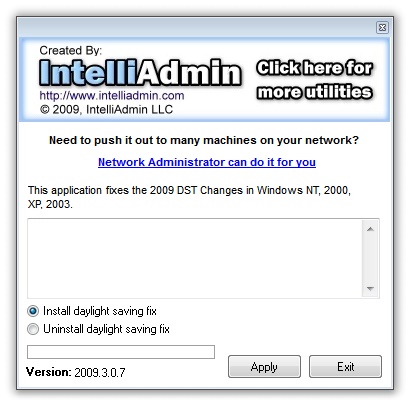
You can download the free application from here:
You can use Network Administrator to deploy it across your network, since it has the updated settings too:
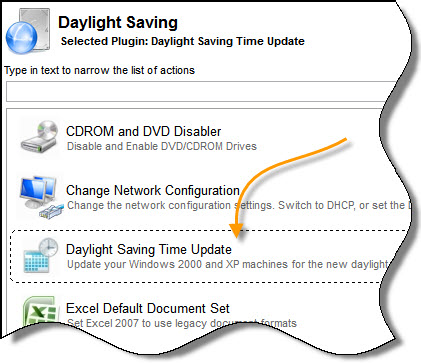
You can download it from here:
Network Administrator Download
Post from 2007 Continues below:
You may have forgotten by now, but two years ago the US government changed the dates for daylight saving time. When the law was passed it was set to take effect in 2007.
Well, here we are. It is 2007, and Microsoft has published updates for XP, and 2003. But…No update for 2000 Workstation, or any of the server editions.
This is a huge problem for many organizations. I know some companies that have hundreds of Windows 2000 boxes. The thought that they will need to upgrade to XP or 2003 (Just for this) is a nightmare. Microsoft is providing a hotfix – but only to the companies that have an extended support contract. To their credit, Microsoft does provide a registry workaround for the rest of us.
The workaround that Microsoft provides is not easy to follow. Check out the KB article at Microsoft.
We have created a utility that will update any machine to the new daylight saving format (XP, NT, 2000, 2003, Vista). Obviously you only need it for 2000, or NT since those operating systems have dropped off support.
It updates Daylight Saving Time (Yes it is Saving, not Savings) in these time zones:
-Alaska Standard Time Zone
-Central Standard Time Zone
-Eastern Standard Time Zone
-Mountain Standard Time Zone
-Pacific Standard Time Zone
-Atlantic Standard Time Zone (Canada)
-Newfoundland Standard Time Zone (Canada)
If we are missing another US timezone that supports daylight saving time, please let us know by emailing support@intelliadmin.com
The utility can install, or uninstall the change. It runs without any setup and requires no extra DLLs or runtime. It is less than 1mb, so you can put it on a flash drive:
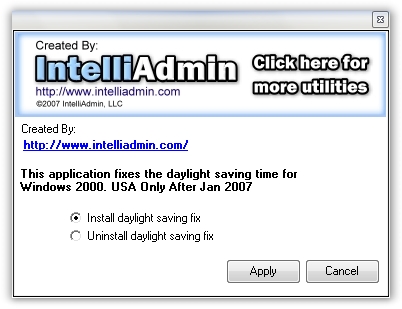
It can run silently from the command line if you use these options:
Install:
DaylightSavingFix.exe /qinstall
UnInstall:
DaylightSavingFix.exe /quninstall
Please note that the program must be run as administrator since it access HKEY_LOCAL_MACHINE
If you want to roll it out to multiple machines we have updated our Network Administrator product to install the patch.
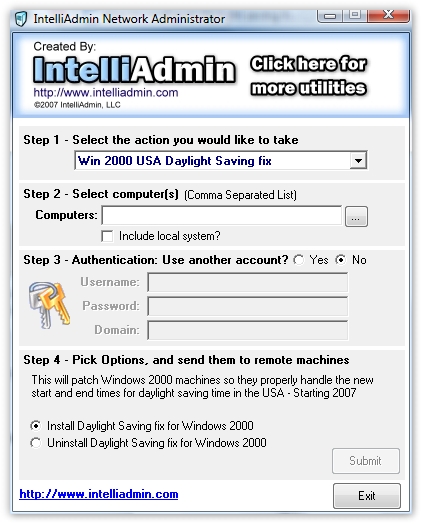
Both can be downloaded from our downloads section
One more thing…Subscribe to my newsletter and get 11 free network administrator tools, plus a 30 page user guide so you can get the most out of them. Click Here to get your free tools
{ 1 trackback }
{ 27 comments… read them below or add one }
Hi, I get “daylightsavingfix.exe is not a valid Windows NT application” under NT4 server SP6. Is there an issue? Can you tell me what the Oct 2009 patch changed? We are seeing “localtime” issues under nt4 not seen on the previous rollback from DST. Thanks
Mike
I would try to download it again. That usually happens if half the file is missing. It should work fine on NT 4
Hi, The md5 is 3db885fc509a98e4b1e7d903fa4b69f5. It executes in Vista but I get that error under NT4.
OK. We will take a look. Possibly our compiler is setting a switch that does not allow NT 4 execution
does this patch require reboot?
Usually yes…not because windows needs it, but because most applications are not smart enough to re-read the DST settings.
Does your DS (2009) fix include New Zealand Standard time and Australian TIme Zone changes?
Cheers,
MA
Yes they do.
Hi,
When trying to apply the patch to a Windows NT server, I get the error about the file not being a valid NT application file. The downloaded size of the file is 785KB. I downloaded it twice and got a file of the same size both times.
-Jacob
Try downloading it again. We re-compiled with our older compiler. It should work for you now
Thank you for this tool, i just had to re-build a Windows 2000 server, and i was dreading hacking through the registry fix manualy..
Thank You !!!! for this patch!!!!
THANK YOU!!!!!
Is there a source code for the registry changes available?
That would be interesting.
Please tell me you are going to do another for the one on NOV 7 of 2010…Now that there is no 2000 support we may get nothing from MS
Darren,
No need to do “Another One”. The current patch we have for 2000 will work fine…unless congress decides to change it again 🙂
You are a lifesaver.
Thanks a lot .. that worked for me
I just pointed an email hosting customer to this fix, hopefully it works for him!
I can’t remember how I patched my 2k box way back when, but I know it wasn’t this easy. I miss 2k, vista64 drives me nuts with its disk subsystem and unsigned driver BS.
Thanks for making this fix available!
Just wanted to chime in and say thank you for this. Worked great on a Win2K server we still have running.
After installing the daylight saving fix on Windows XP my outlook crashes every time google calendar sync tries to sync my calendars. Please help me with this. Ive also tried the official microsoft KB942763 fix.
You will need to install the latest patches for Outlook as well – it too has its own DST issues.
Should I leave the “Automatically adjust clock for daylight savings changes” box checked in the Date/Time Properties | Time Zone window (retrieved when clicking on the time/date in the taskbar)? Or will this cause 2K to “re-adjust” DST when the older change dates arrive later in the year?
Yes If you are in a DST area, you would leave that clicked.
If you are noticing that you are still an hour off after clicking this…it means your computer still needs to be patched.
If your computer is already patched…it might mean your computer is joined to a domain, and the domain controller needs to be patched.
Keep in mind that only Windows 2000 machines need our patch. The rest should automatically get it from MS.
I’m glad you guys are still here! I’ve used your 2000 DST patch in the past.
Between you guys, BWC, WB and tomasz over on the MSFN and RyanVM boards you’re all helping to keep my preferred
Redmond OS viable.
A ton of thanks!!
Yep..still here. Maybe Congress will change it again, and we will have that fun one more time with Windows XP 🙂
Thanks – Steve
My NT domain controller is off by an hour still… the thing is, it’s off by an hour in the other direction that the windows 2000 server I just patched and which is now correct. The NT machine has correct time if i turn off “adjust for daylight savings time”. Maybe it’s because it’s connected to a local unix time server?
When you say NT…do you mean NT 4? Or a newer version of Windows 😉
Either way…something along the line has a DST issue. I would look in the direction of the time server