
I have a machine that runs at a cabin up in northern Michigan. For the longest time it was a Windows 2000 server. It is a simple file server, DHCP, and a NAT device for a few neighbors that use it via wireless.
I finally made the plunge and upgraded it to Windows 2003. Before I brought it back up there I realized I might have a problem. Once in a long time the machine needs to be rebooted. My neighbors only know how to do this by following a specific set of instructions. Click Start, then Shutdown, Etc.
Now with Windows 2003 The user is prompted with this:
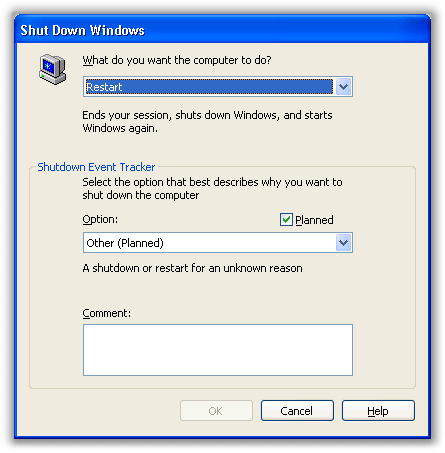
I don’t even want to start thinking of the retraining I would need to do just to get the machine rebooted 🙁
Since I have been living with this inconvenience for years I didn’t think to check and see if there was a way to turn it off…after a few quick Google searches I found out how.
To disable the shutdown event tracker you will need to open the Group Policy Object Editor. You can do this by clicking on start, then run. Type: gpedit.msc and press the OK button.
The GPOE will show you a list of options. Drill down to this area:
Computer Configuration -> Administrative Templates -> System
Now look in the pane on the right.
See the option that says “Display Shutdown Event Tracker”
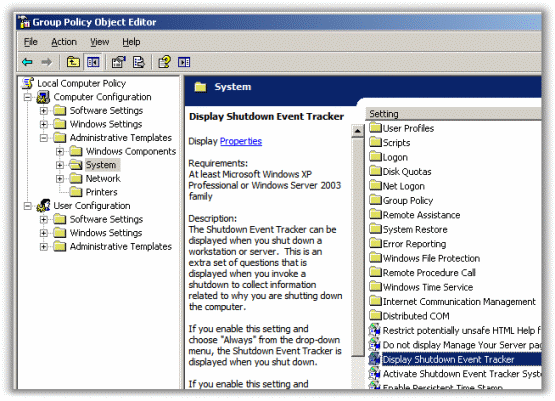
Double click on it to change the option. Now change it to disabled.
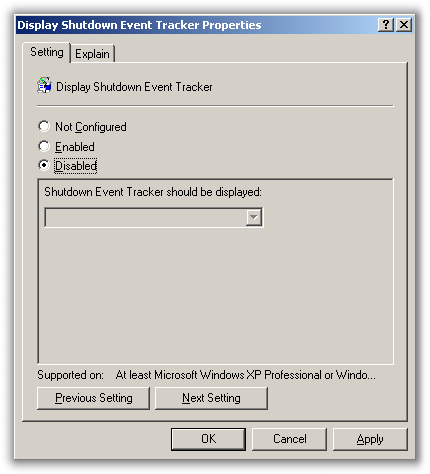
Click OK and from now on you won’t be bothered by the shutdown tracker.
One more thing…Subscribe to my newsletter and get 11 free network administrator tools, plus a 30 page user guide so you can get the most out of them. Click Here to get your free tools
{ 1 trackback }
{ 0 comments… add one now }