
Update (8/30/2007) – We have released our patch (Find out more here)
We have been getting quite a few requests to update our free DST patch for NT4, 2000, XP, and 2003 to include the recent changes to the New Zealand daylight saving time.
The work is still in progress and we will be releasing an update to our free patch within days. The progress on the patch was delayed slightly by some mis-information provided by Microsoft.
We were testing our patch using the manual test procedure provided by Microsoft. Look at it below:
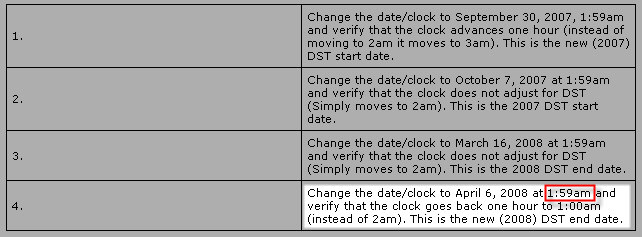
Yes it looks perfectly normal. It matches what you would think if you are looking at North American DST changes. Unfortunately it is wrong. If you go to the New Zealand Department of Internal Affairs website you see this:

This means DST rolls over at 2:59AM NOT 1:59AM!!!
Argg!!! This is serious business. I wish Microsoft would treat it that way. This same type of thing was happening all over the place when the North American TZ change was happening. Hopefully this page will be updated soon. Couldn’t MS check and make sure this info was correct before posting it?
BTW – Their patch does roll over at the correct time…You just can’t test that using their incorrect time.
One more thing…Subscribe to my newsletter and get 11 free network administrator tools, plus a 30 page user guide so you can get the most out of them. Click Here to get your free tools