
I don’t know if it is a bug in IE, or if my Nephews are playing a game with me. Suddenly over the weekend I started to get prompted for the parental controls password

Hmm. I do not know the password…since I never set one. If I try to turn it off or modify it by going into Internet Explorer settings…
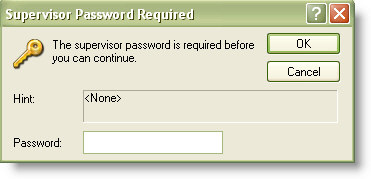
Quick search of the net and I discover that you can simply browse to this key in the registry:
HKEY_LOCAL_MACHINE\Software\Microsoft\Windows\CurrentVersion\Policies\System
See the key that says Ratings?
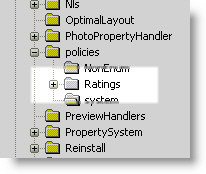
When I deleted it I was able to get back into IE again.
Now I can browse to any site I want, without being asked for a password.
Update: Just got a note from a reader:
Steve,
Um…you just told my kids how to get around the parental controls. Thanks!
David
David – Actually not. If you only allow your kids to have a non administrator account they cannot access the HKEY_LOCAL_MACHINE key in the registry.
One more thing…Subscribe to my newsletter and get 11 free network administrator tools, plus a 30 page user guide so you can get the most out of them. Click Here to get your free tools
{ 7 comments… read them below or add one }
Worked great, thanks a lot.
So does this also eliminate time restrictions?
i cant find it please help me…..can you guide me step by step pplease……..
my daughter messed it up and cant fix it.
how can i unstal parental control without mesing up other wrbsites
Not sure what you mean…either it is on or off. It does not mess up websites.
Hey I got all of the way up to the registry HKEY_LOCAL_MACHINE\Software\Microsoft\Windows\CurrentVersion\Policies\System and when I looked for the ratings folder it was not there.It had the folders hardware,security,sam,software,system, and wpa. Can you please help me?
Hello Anna,
If it does not exist, you need to create it. In this situation it means that the parental controls are not set in that key…so I am not sure where they would be on your system.
What version of IE, and what version of Windows do you have?
Steve