
I have been seeing this message on and off with attachments for some time now in outlook:
Can’t Create file: VoiceMessage.wav. Right-Click the folder you want to create the file in, and then click properties on the shortcut menu to check your permissions for the folder
In this case it was a voicemail. Sometimes it is a PDF file, other times it is a BMP. The only connection I started to notice was the name of the file.
After some research I discovered that Outlook saves every single attachment you download – in a temp folder. If the same file name exists, it simply appends a number like this:
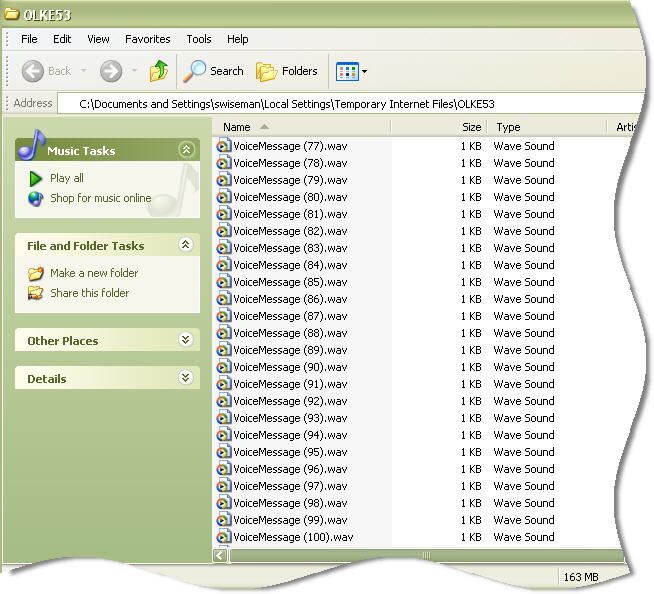
The only problem is that it gets stuck at 100. Once you have had 100 attachments with the same name you get the error message I described.
The trick is finding *where* outlook is storing all of this.
Update August, 2010 – We just created a utility that will clean up this folder for you. Look for the Outlook Cleanup Tool in our downloads section.
For more information about the download, visit this page
Microsoft decided that they would create a random folder name to keep viruses and maleware from finding this folder and exploiting it to their advantage.
The folder path can be found under this key:
HKEY_CURRENT_USER\Software\Microsoft\Office\11.0\Outlook\Security
See the variable on the right named “OutlookSecureTempFolder” – That is your path
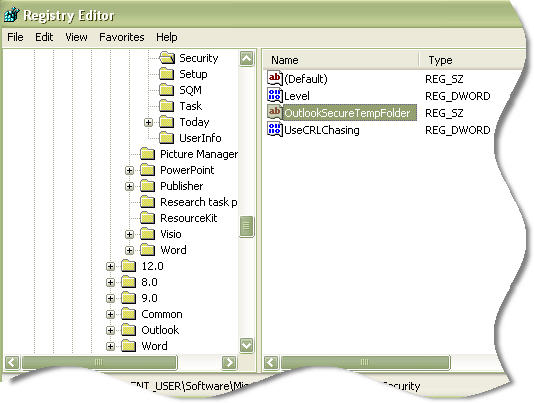
Now that you know where the files are you can simply clear them out from time to time, and the error will go away.
Still, I am a little irritated that this problem has not been fixed by know in a service pack, or a patch. Hopefully Outlook 2007 does not have the same issue.
One more thing…Subscribe to my newsletter and get 11 free network administrator tools, plus a 30 page user guide so you can get the most out of them. Click Here to get your free tools
{ 50 comments… read them below or add one }
You’re a genius 🙂
This has been driving me nuts all morning! THANKS!
Awesome ! That was exactly it – that was VERY annoying….
Thanks a lot. Your information solves my problem at all.
Thanks, fixed the problem easily here.
FYI it is not fixed in Outlook 2007 maybe we can hope for a fix in 2010
Does anyone know the fix for Outlook 2007? Followed the above steps but there is no ‘OutlookSecureTempFolder’. I saw another site that referenced 12.0 vs 11.0 for Outlook 2007 but 12.0 does not exist either.
Any help would be greatly appreciated.
The procedure is the same for 2007. Except that you will find it under this key:
HKEY_CURRENT_USER\Software\Microsoft\Office\12.0\Outlook\Security
Had the exact same issue with 2007. These steps worked great. You’d figure a temp folder would be just that temp! lol I wonder how long it actually stores the attachments
Solved my problem in Outlook 2003 today. This had been bugging me for some time. I decided to do something about it today and fortunately found this post.
This seems like the fix for my problem, but the path given in regedit does not exist…??? It says the path for OutlookSecureTempFolder is “C:\documents and settings\btalbert\local settings\temporary internet files\content.outlook\r1wj1k5w.” When I start browsing (and I can see the hidden files), I get to local settings, and the only choices are Application Data, Apps, and Temp..???
Any idea how to proceed?
Thanks-
Try putting the entire path into explorer…I think that will get you there.
Awesome! Thanks so much.
Thanks! This helped out 100%!!
I developed an Outlook plug-in and was contacted by support where the application stopped working for one user. I went over and over the code until I thought to google the error – nondescript as it was. Thank you for all the grief and aggravation that you saved me.
Thanks, that was exactly what I was looking for!
The easiest way to permanently fix this problem is just to create a new folder on your C drive and then set the value data of the outlooksecuretempfolder to this newly created folder. You then wont be limited to 100 objects.
Not true. You will still run into the issue when you reach 100. Then you would have to change the folder again. And keep repeating the process over and over.
THANKS! had same issue on outlook 2007. this did the trick.
I have the same problem with the 100 mark, even though i have placed the temp folder on the c:drive and changed the valuedata in the regestry to that folder. Does anyone know how to fix this problem so i want have to delete these file from this folder ?
As far as I know, there is no fix. The issue is still in the latest version of Outlook. The work around is to have a batch file run in the task scheduler that will clear out this folder from time to time.
Thank’s for the fix, but I’m really pissed off that Microsoft hasn’t fixed this since Outlook 97! It’s a well documented problem. The fix is easy. Either A) force users to save their attachment before they can open it, or B) delete *.* in the temp folder every time Outlook is started.
Outlook 2010 is in beta, andI bet it still works the same way as the previous ones.
I can’t impliment a batch file to clear out that folder because the folder is randomized. Try writing a batch file for 1000 users with different temp folder names!
I wanted to call Microsoft’s Office division about it, but they charge for you to call them to tell them something is wrong. What the heck?
HAD THE PROBLEM LAST NIGHT AND COULD NOT FIND FOLDER, WENT THROUGH EVERYTHING. SAT ON PHONE WITH MICROSOFT CUST SUPPORT FOR AN HOUR AND HE DID SOME MUMBO JUMBO STILL NOT FIXED, SHOWED HIM THIS POST AND HE WENT TO RUN: UNDER START BUTTON – TYPED IN ‘REGEDIT’ AND FOUND IT UNDER THE FOLLOWING FOLDERS: HKEY_CURRENT_USER\Software\Microsoft\Office\12.0\Outlook\Security
DELETED THE ENTIRE FILE RIGHT THERE CALLED “OutlookSecureTempFolder” AND MY PROBLEM IS NOW SOLVED!
FUNNY I HAD TO SHOW THE MICROSOFT TELEPHONE TECH GUY THIS POSTING AND LINK TO HAVE HIM FIX IT
Thank you so much! Once I was able to find the folder I deleted all the voicemail attachments and I am again able to open my voicemail attachments without having to save them first. AND I know how to fix the issue when it comes up again. And I know it will since I have all my voicemails emailed to me.
Thanks for this, just had a user that has had this problem and it has fixed it for now 🙂
Thanks,
One of my users had a similar problem with Outlook 2007 not being able to open or preview a specific excel file. She was unable to open an attachment that she receives daily as an attachment from a customer. The excel attachment file name is always the same. Looks like Outlook has some sort of maximum temp file with same name and won’t open anymore files with this name once it reaches the maximum. Problem was solved by cleaning up the following folder:
%drive%:\Documents and Settings\%user%\Local Settings\Temporary Internet Files\Content.Outlook\XXXXXXXX
wherre XXXXXXXX is an 8 character random name.
You might not be able to find the folder by browsing with windows explorer but you can paste the following link in Start-Run (don’t forget to change the drive letter and username):
%drive%:\Documents and Settings\%user%\Local Settings\Temporary Internet Files\Content.Outlook\
This will open a windows explorer window and you will find the random name temp subfolder there.
Good luck!
I have avoided a user for 1 week as i had no solution and i had no time to investigate. I decided to check online and i found your suggestion very direct. I just walked over to my user now and he is a happy man… but i am the hero!
You’re a genius mate 🙂
I’ve spent bloody half a day for that and it was so easy…
You don’t even need to go to registry editor as it is enough to go to:
C:\Documents and Settings\\Local Settings\Content.Outlook\
and remove all the files and folders from that location.
Cheers,
Aro
Tepes, you ROCK! I had no idea you could put the full path into the run command, and get the explorer window to pop up. Worked like a charm!
OK here’s an even easier solution, since I was having trouble finding the correct folder.
Just search your computer for the name of the file that was giving you trouble… In my case it was
“voice-message.wav”
IMPORTANT – don’t include the suffix (.wav or whatever) in your search because windows adds the numbers up to 99 before the suffix…
then pick one of the files that comes up in your search, and it will take you to the correct folder.
Then simply highlight the ones you want to trash and delete them… problem solved (at least until you get to 100 more of an attachment with the same name)
I am having the same problem. I have window 7. I can not find the folder. Please help
I have Windows 7 and Outlook 2007. Only change I had to make was rather than 11.0 in his example, I had a 12. Bottom line is that I found them sitting in my temporary Internet file folder. Ninety nine of them… too funny. Deleted them and PRESTO Outlook is now happy.
EXCELLENT! SPARED ME 2 HOURS OF VOID SEARCHING
THANKS A LOT
Just wanted to say thank you and to add my two cents to the thread.
I had this message pop up on my system yesterday and found this link in about 2 minutes of searching.
I’ve been playing around with this and found that you can simply delete the entire random named sub-folder as Outlook will recreate an new randomly named folder when you open an attachment.
Some quick wins to get this dealt with are:
————————————————————-
You can get the temp folder detail by looking at the web browser Address bar if you open HTML file attachments to shorten your hunt time. IE won’t let you browse to the folder so you will have to copy and paste.
You can also paste one of the below paths into the Run.. dialog or Windows Explorer address bar to see your folder:
Windows Vista
C:\Users\%username%\AppData\Local\Microsoft\Windows\Temporary Internet Files\Content.Outlook
Windows XP
C:\Documents and Settings\%username%\Local Settings\Temporary Internet Files\Content.Outlook\
Windows 7 – my tests didn’t like the %username% property so you will need to find the name of the profile folder buth the rest is the same.
C:\Users\[username]\AppData\Local\Microsoft\Windows\Temporary Internet Files\Content.Outlook
Hope that helps speed up your TTR and good luck.
An even easier option for all of this is to open Internet Explorer and use it to Delete your Temporary Internet Files.
This clears out the files you need to get rid of, and a whole pile of other junk that you don’t need as well.
My testing shows that this does not clear out these files for Outlook. Can you tell us what version of Outlook you tried this on, and it worked?
Thanks!
Found easier way to find these temporary Outlook files that stop opening when clicking attachments.
Go to: Programs>Accessories>System Tools>Disk Cleanup and click on Temporiary Internet Files, then click View Files, and you’ll find them there, and you can delete the ones with (99), (98) behind the file name from this screen.
Unfortunately this does not work. For example, on a test system your instructions bring me to this folder:
C:\Documents and Settings\swiseman\Local Settings\Temporary Internet Files\Content.IE5
When the files causing the problem are actually here:
C:\Documents and Settings\swiseman\Local Settings\Temporary Internet Files\OLK1A6
It gets you close..and is an easy way to get to the folder since you could click on “View Files” go up one folder…and then start looking for a random folder name…and then finally get the offending files.
You guys are awesome! A client of mine has had problems opening an Excel attachment for months and we were totally stuck. This fix, plus Steve’s great advice for finding the file in Explorer, finally resolved the issue.
Steve – if you’re ever in Seattle, I owe you a double-tall at Starbucks!
Best,
DwC
Thanks for the info… I couldn’t find the file so I just changed the path in the registry closer to the top of the root… it’s easier to get to it to delete them little buggers now too and that sounds like a work-around to me…
Now for the million dollar question, who knows what makes the back and forward buttons in IE8 on Win7 stop working every once in a while?? If you hit the dropdown arrow and select the site the back and forward still functions as does the right click->back, just no buttons until you reboot… That’s my biggest pet peeve right now, I hate that and it always happens when you have a thousand things going on and a reboot is a pain…
Awesome tip. Worked perfectly.
E
THANK YOU SIR!
2010 still has the issue. we are beta testing.
Thanks for posting this!….It really works!
Regards!
Just heard the fix is slated for Office 2035, so we’re a mere 25 years off.
This fix works wonders. I was actually stuck on the same issue for nearly an hour. Was able to open the Doc in Safe mode and not in the normal mode.
So deleted the HKEY_CURRENT_USER\Software\Microsoft\Office\11.0\Outlook\Security key from registry.
And there you go !!! It opened the Doc right Away ~~
Thanks for the piece of info
Thanks its awesome
FYI, Microsoft is defaulting this to the local user profile folder set. \Local Settings\Temporary Internet Files\Content.Outlook
The folders Temporary Internet Files & Content.Outlook are not visible in the Windows Explorer display, so they will need to be typed in to the address field.
Sadly deleting Temporary Internet Files in IE leaves the Content.Outlook folder intact.
thank you!!! worked like a charm, that’s all I needed to actually continue working. Appreciate it!
You are the man! Made me look the smartest person in the office! I love the Internet.