

Back in 2007, I wrote an article about an error that you get in Outlook when you have too many attachments of the same name:
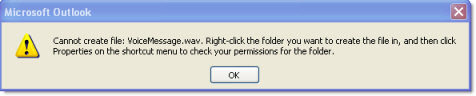
Even Outlook 2010 has this problem.
In the article, I walk you through deleting these files by hand.
It is not an easy thing to do. You need to open the registry, find a key…then use that key to find a random folder name.
I thought it would be cool if we could build a utility that would do this for you. So, that is what we did:
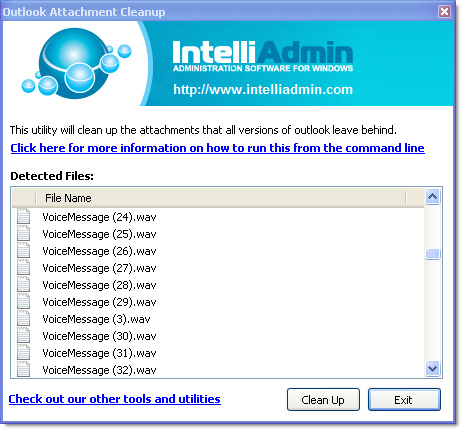
It will automatically scan your registry, find all Microsoft Outlook attachments, and then display them to you in the main window.
If it all looks like stuff you want to remove, you just hit the “Clean Up” button and it will delete them for you.
Here comes the bonus. You can run it silently from the command line.
What would you need that for?
You might have user that opens lots of attachments, and runs into this bug all the time.
Here is how you can have it run without any prompts:
OutlookCleanup.exe /SILENT
It will quietly scan through your registry and find the temp folder and empty it. Throw this in a batch file and have it run at logon – you will never have to deal with this problem again.
Another thought came to mind while working on this: This is a security problem too.
While email is on your Exchange server…it is relatively secure. Not knowing this you might open a sensitive document, read it, and when you are finished – delete it. Unknown to you, Outlook has just made a copy of it and it is sitting right there on your hard drive. Waiting for someone to grab.
Until MS provides a fix, you can use this little utility to keep your Outlook attachments clean. I wouldn’t hold your breath waiting for an update – this bug has been around since 2002.
Get your copy from our free downloads page
One more thing…Subscribe to my newsletter and get 11 free network administrator tools, plus a 30 page user guide so you can get the most out of them. Click Here to get your free tools
{ 16 comments… read them below or add one }
Steve,
Won’t this screw up outlook in some way? Will it delete those attachments from my email?
No this will not. The reason why Outlook does this is because your attachments are stored in MIME format. Extracting them out of MIME takes lots of processing time.
So Outlook keeps a copy…so the next time it does not have to extract. It just gives you the cached version.
The only downside I can see is that larger attachments will take longer to open the second time around.
I can’t tell you how many times we have run into this issue. Thanks for creating this free tool.
This appears to either delete all or none, is this correct or can you delete selected files ?
I think the appropriate word woulds would be “Add a feature”. Yes we can do that. Probably by Monday we can have a new release that will let you pick and choose which files to delete.
We just updated the application to include…a clear all, and clear only selected items…Enjoy
Maybe I just need more coffee this morning but if I try to run this from command line using the /SILENT switch nothing happens. If I remove the /SILENT it works fine. Anyone else have this issue? Windows 7 64bit.
OK. We looked through….and it was a bug. Download again, and it should now work.
Hi,
Nice application! Thanks a lot!
Would be nice if you could double click on any item and have it open in the default application.
Also, could you make the window a little bitter taller so the line is not cut off? That is the 10th item is not fully visible. You have to scroll down.
Could you also please add “Size” and “Date Last Accessed” ? That would help the user decide if file(s) should be deleted.
You should also add a version number (or at least a date of release) some were, makes it easier for users to know they have the latest build.
Thanks,
Will
Installed the Outlook Cleanup Utility on a Windows 7 64 bit OS w/Office 2010. Our phone system sends wav files as described in problem, but no files are detected when utility is executed. What I’m I missing?
We run into this problem continually with the large number of faxes routed to email. This tool has been a life-saver!
I work at a help desk and run into this problem almost daily just wondering if its possible to run this remotely?
Very good question. We will have to look into this…
Steve
Dear Sir, hope this finds you well. Just a question concerning your Outlook Attachment Cleanup, someone told me that when we delete e-mails they are not actually deleted, is this true? and does your program clean up the deleted files and if not do you know how I could do this? (need space)
If you delete the emails and empty your trash, they are deleted….but the attachments associated with them are still hanging around, taking up space. To free this up, just use the above program to clean them out.
Steve
I like the /silent switch, however this won’t work when run as a different user than the one that is affected. For example, if a user calls the helpdesk complaining that they are getting the Outlook error (because their temp folder is full), there is no way for the helpdesk to run this utility remotely (via PSExec, or similar) AS the user – it will always run under the profile of the user who runs the application. Would it be possible to add the ability to search ALL local profiles on the machine, and select which ones to clear and/or just clear them all? If this could be added, and used in conjunction with the /silent switch it would allow administrators to schedule a task to run on a weekly/monthly basis on all machines to clear out the Outlook temp files and potentially prevent the issue from ever occurring in the first place. For now, I can write a script and just send the user a link to run the script when they complain about the issue – but the other method would be preferable. Either way, thanks for this free tool!