
.
We just released a new version of our freeware remote reboot utility. It is a replacement for one we have had on our site for quite some time now. We added the ability to manually pick a hostname, and pick alternate credentials
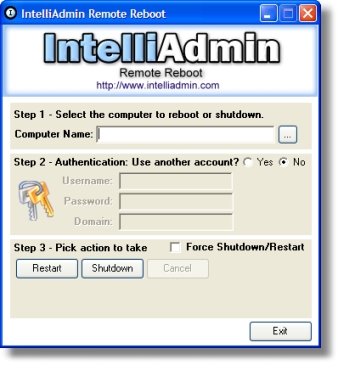
No extra dlls, or .net runtimes are required. It just runs without any installation, and can be found in our downloads section. As always no spyware, adware – Just freeware goodness.
Requires at least Windows 2000.
One more thing…Subscribe to my newsletter and get 11 free network administrator tools, plus a 30 page user guide so you can get the most out of them. Click Here to get your free tools
{ 3 comments… read them below or add one }
Have used this tool for years, then needed it today and forgot the name, finally found you from a google search, thanks!
I tried the trail version to restart machines and got an access denied error, even though i have correct credentials. Have you seen this before?
Sure. It depends on the version of Windows on the remote side. A few things to look out for:
-On Windows XP you cannot use ‘Simple File Sharing’ It will never allow access in this mode
See this article for more details:
http://www.intelliadmin.com/index.php/2008/12/enabling-file-and-printer-sharing-in-windows-xp/
-On Vista, and Windows 7, Microsoft has locked everything down by default See these articles on how to make the appropriate changes:
WIndows 7:
http://www.intelliadmin.com/index.php/2009/08/windows-7-the-admin-share/
Windows Vista:
http://www.intelliadmin.com/index.php/2008/12/enabling-file-and-printer-sharing-in-vista/
In addition to all that make sure there is a password for the account you are using. If you have no password set, you will always get access denied. This is a security feature of Windows.